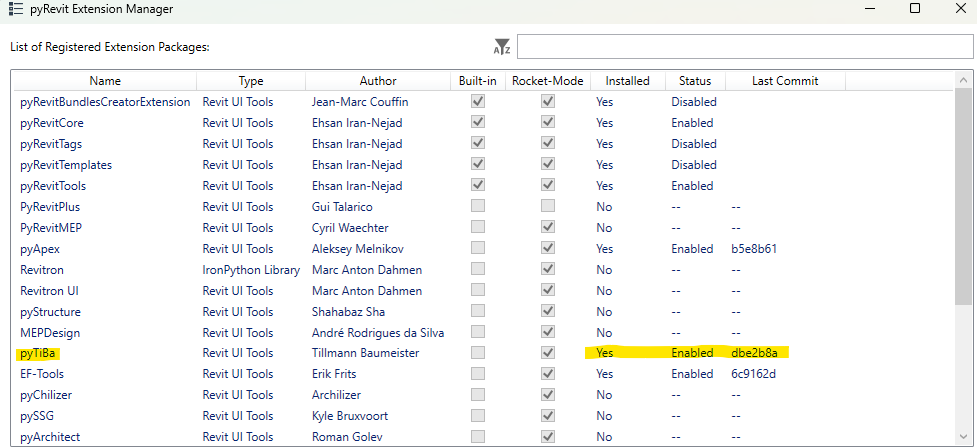
I am currently using Revit 25 and am trying to install the pyTiBa extension through the pyRevit Extension Manager. (I am using the pyRevit version v6.4.0.) It seems to have installed according to the Extension manager as under the “Installed” column it says “Yes”. When I close out of the Extension Manager the pyTiBa tab doesn’t appear on the ribbon.
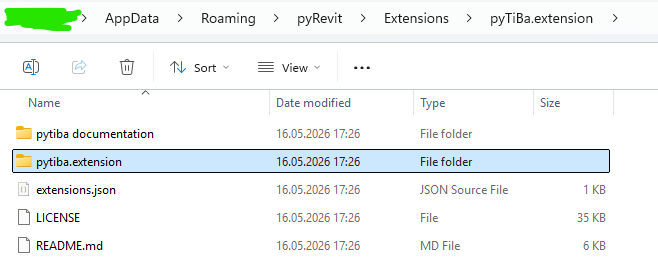
I can confirm that in the following location C:\Users\Username\AppData\Roaming\pyRevit\Extensions that the “pyTiBa.extension” folder is there.
I have tried manually adding the “ExportDlgValues” inside the following location C:\Users\Username\AppData\Roaming\pyRevit\Extensions\pyTiBa.extension\pytiba.extension\pyTiBa.tab\Export.panel. This method was from the forum “PyTiba not working” from May 2025 and it is still missing from the ribbon after I close out Revit, Open Revit and reload pyRevit.
If anyone has come across this problem and has found a solution please let us know.
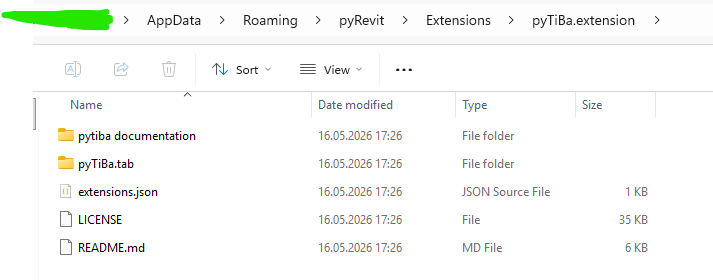
Can confirm. The owner of this repo has accidently moved all tools into a wrong subfolder. Digging throught the repo this happened around 01/2026. You need to contact directly to have him fix it. To get it running for you, move everything one layer up.
Current (not working):
The PR is merged.
If you now remove the previous install of the extension and install it back using pyRevit extensions manager, this should work. @JJ0320@cancaa@JohnRP
mytools.extension
→extension.json
→mytools.tab
→→mytools.panel
→→→mytools.pushbutton
→→→→my_script.py
OK, so this approach still works.
I am currently not working with Revit anymore.
I think I changed it. I removed the “mytools.extension” some time ago.
Anyway, I merged it!
Please notify me, if something is still wrong.