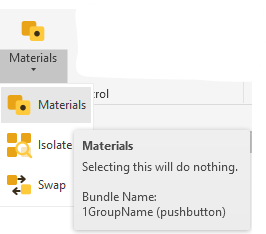
When using the Pulldown Bundles, the Icons are small in the pulldown
Is there a way to make them all big?
When using the Pulldown Bundles, the Icons are small in the pulldown
Is there a way to make them all big?
Can you find any large icon in a drop-down in Revit?
If not, you have your answer. At least the default possible behavior. Even though this days, I can only assume there is a way. If you piggy back on the windows dll and not the Revituiapi one
there is a “hack” i tried it on some of my buttons/icons. I ultimately decided not to use them but it worked.
Thanks to the Team for the new “large_icon” option in the bundle.yaml files
This is working a treat!