When using the stack bundle, will the icons resize when I only use 2 tools per stack or is the icon just two sizes, large and small?
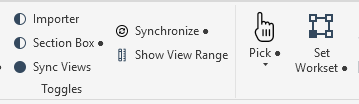
I am making this 2x2 stack but the icons are small that you can barely make it out
When using the stack bundle, will the icons resize when I only use 2 tools per stack or is the icon just two sizes, large and small?
I am making this 2x2 stack but the icons are small that you can barely make it out
I believe this is a limitation in the RevitAPI, it only has two sizes for buttons, so regardless of 2 or 3 items in a stack it will use the same small icon size of 16x16.
It can be “hacked” to display 24x24, but not officially supported in API.
https://forums.autodesk.com/t5/revit-api-forum/24x24-stackeditems/td-p/9168470
Thanks for sharing. At least I know now.
on a second note, i do notice that in a splitbutton it will show them at a larger size. Not sure if that could be a hack for pyrevit to explore.
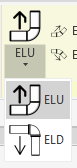
fyi, for those curious, i was able to implement this using a startup.py at the root of the extension. here is my example that worked (currently had two pulldowns in stack). I know it is not officially supported by the API so if it ever gets removed by Autodesk, the startup.py can be deleted.
Before and After


and use item.ShowText = False/True to show/hide the button names
# -*- coding: utf-8 -*-

import clr

clr.AddReference("AdWindows")

from Autodesk.Windows import ComponentManager, RibbonItemSize
from pyrevit import HOST_APP


# Target ribbon location:
# NXGN[Core].tab > Drawing Set.panel > SheetView.stack
# The actual runtime ribbon items we want to resize are the child controls
# inside that stack: "Sheets" and "Views".
TARGET_TAB_NAME = "NXGN[Core]"
TARGET_PANEL_NAME = "Drawing Set"
TARGET_ITEM_NAMES = ["Sheets", "Views"]

_done = False
_attempts = 0


# startup.py runs very early during pyRevit startup.
# In testing, this code was executing before the pyrevit extensions
# were fully populated, so a direct one-shot call from startup.py did not work.
#
# Using the Revit Idling event delays execution until the UI is far enough along
# that the target ribbon items actually exist.
#
# At the moment, one Idling pass has been enough, so MAX_ATTEMPTS is set to 1.
# If this ever becomes inconsistent on another machine or after a future update,
# this value can be increased.
MAX_ATTEMPTS = 1


def safe_str(x):
    try:
        return str(x)
    except:
        try:
            return unicode(x)
        except:
            return ""

def walk_items(items):
    # This recursive walker allows the script to search through all nested children
    # under the target panel until it finds the specific controls to modify.
    # So far this has worked for .stack bundle.
    if not items:
        return

    for item in items:
        yield item

        try:
            for child in walk_items(item.Items):
                yield child
        except:
            pass

        try:
            src = item.Source
            if src:
                for child in walk_items(src.Items):
                    yield child
        except:
            pass

def get_item_values(item):
    # The Autodesk ribbon objects can expose their identifying info in slightly
    # different places depending on the control type.
    #
    # To make matching more reliable, gather several possible identifying properties
    # from both the ribbon item itself and its Source object.
    vals = []

    for prop in ["Text", "Title", "Name", "AutomationName", "Id"]:
        try:
            v = getattr(item, prop)
            if v:
                vals.append(safe_str(v))
        except:
            pass

    try:
        src = item.Source
        if src:
            for prop in ["Text", "Title", "Name", "AutomationName", "Id"]:
                try:
                    v = getattr(src, prop)
                    if v:
                        vals.append(safe_str(v))
                except:
                    pass
    except:
        pass

    return vals

def find_panel():
    # Find the runtime ribbon panel by tab title and panel title.
    # This is more reliable than trying to use the filesystem folder path directly,
    # since the actual UI must be found from the live Autodesk ribbon.
    ribbon = ComponentManager.Ribbon
    if ribbon is None:
        return None

    for tab in ribbon.Tabs:
        if safe_str(tab.Title) != TARGET_TAB_NAME:
            continue

        for panel in tab.Panels:
            try:
                if safe_str(panel.Source.Title) == TARGET_PANEL_NAME:
                    return panel
            except:
                pass

    return None

def apply_hack():
    # This is the actual ribbon hack:
    # - find the target panel in the live ribbon
    # - locate the specific stacked child controls by name
    # - force them to display as Large instead of the normal small stacked size
    #
    # This is needed because standard stacked buttons in pyRevit/Revit display small,
    # and there is no normal pyRevit bundle setting to make those stacked items larger.
    panel = find_panel()
    if panel is None:
        return False

    try:
        items = panel.Source.Items
    except:
        return False

    found_any = False

    for item in walk_items(items):
        vals = get_item_values(item)

        for target in TARGET_ITEM_NAMES:
            if target in vals:
                try:
                    # Force the stacked ribbon child item to use the larger display size.
                    item.Size = RibbonItemSize.Large
                except:
                    pass

                try:
                    item.ShowText = False # Hide or show button names
                except:
                    pass

                found_any = True
                break

    return found_any


def stop():
    # Always unsubscribe when finished so the Idling event does not keep firing.
    try:
        HOST_APP.uiapp.Idling -= on_idling
    except:
        pass


def on_idling(sender, args):
    global _done, _attempts

    if _done:
        # Safety check in case the handler fires again after the script is done.
        stop()
        return

    _attempts += 1

    try:
        # Try once the UI is idle.
        # This is the key part that makes the hack work at startup.
        if apply_hack():
            _done = True
            stop()
            return
    except:
        _done = True
        stop()
        return

    # If the target items are still not available, stop after the allowed number
    # of attempts so the event does not remain subscribed indefinitely.
    if _attempts >= MAX_ATTEMPTS:
        _done = True
        stop()

# Cleanup first in case the script gets reloaded and an old handler is still attached.
try:
    stop()
except:
    pass

# Attach the deferred startup handler.
# This allows the ribbon hack to run after pyRevit has had time to build the tab/panel/items.
try:
    HOST_APP.uiapp.Idling += on_idling
except:
    pass