Hello guys, I am facing weird bug while using CPython. When I use the below code, I am getting IronPython output.
#
#! python3

print("Hello from CPython")
import sys
print(sys.version)
Output -
Hello from CPython
2.7.12 (2.7.12.1000)
[.NETStandard,Version=v2.0 on .NET 8.0.27 (64-bit)]
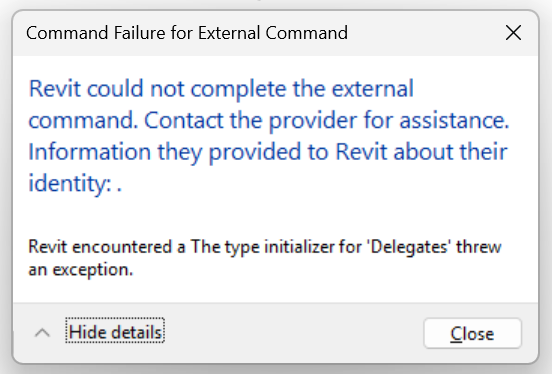
But when I use the below code, I am getting error.
#! python3

print("Hello from CPython")
import sys
print(sys.version)
Jean-Marc
May 23, 2026, 6:05pm
2
Can you check the output of ‘pyrevit env’ command line?
@Jean-Marc Output from pyrevit env -
==> Registered Clones (full git repos)
==> Registered Clones (deployed from archive/image)
master | Branch: "master" | Version: "6.4.0.26100+0515" | Path: "C:\Users\ACER\AppData\Roaming\pyRevit-Master"
==> Attachments
master | Product: "2027" | Engine: DEFAULT (2712) | Path: "C:\Users\ACER\AppData\Roaming\pyRevit-Master"
master | Product: "2026 First Customer Ship" | Engine: DEFAULT (2712) | Path: "C:\Users\ACER\AppData\Roaming\pyRevit-Master"
master | Product: "2025 First Customer Ship" | Engine: DEFAULT (2712) | Path: "C:\Users\ACER\AppData\Roaming\pyRevit-Master"
master | Product: "2024.3.4" | Engine: DEFAULT (2712) | Path: "C:\Users\ACER\AppData\Roaming\pyRevit-Master"
==> Installed Extensions
guRoo | Type: Unknown | Repo: "https://github.com/aussieBIMguru/guRoo.git" | Installed: "D:\Software files\Revit\pyRevit plugins\guRoo.extension"
pyChai_dev | Type: UIExtension | Repo: "" | Installed: "D:\Code Development\Projects\BIM\Revit\pyChai\extensions\pyChai_dev.extension"
==> Default Extension Search Path
C:\Users\ACER\AppData\Roaming\pyRevit\Extensions
==> Extension Search Paths
D:\Code Development\Projects\BIM\Revit\pyChai\extensions
D:\Software files\Revit\pyRevit plugins
==> Extension Sources - Default
https://github.com/pyrevitlabs/pyRevit/raw/master/extensions/extensions.json
==> Extension Sources - Additional
==> Installed Revits
2027 | Version: 27.0.4.412 | Build: 20260228_1515(x64) | Language: 1033 | Path: "C:\Program Files\Autodesk\Revit 2027\"
2026 First Customer Ship | Version: 26.0.4.409 | Build: 20250227_1515(x64) | Language: 1033 | Path: "C:\Program Files\Autodesk\Revit 2026\"
2025 First Customer Ship | Version: 25.0.2.419 | Build: 20240307_1300(x64) | Language: 1033 | Path: "C:\Software installed\Autodesk\Revit 2025\"
2024.3.4 | Version: 24.3.40.26 | Build: 20250918_1515(x64) | Language: 1033 | Path: "C:\Software installed\Autodesk\Revit 2024\"
==> Running Revit Instances
Error: Object reference not set to an instance of an object.
Run with "--debug" option to see debug messages
For now, I have to use python subprocess as a workaround.
Jean-Marc
May 26, 2026, 10:13am
5
it seems the #! is ignored
porrt23
May 29, 2026, 7:41pm
6
opened 02:20PM - 10 Apr 26 UTC
closed 12:03PM - 11 Apr 26 UTC
Bug
### ✈ Pre-Flight checks
- [x] I **don't have SentinelOne** antivirus installed … (see above for the solution)
- [x] I have **searched in the issues** (open and closed) but couldn't find a similar issue
- [x] I have **searched in the [pyRevit Forum](https://discourse.pyrevitlabs.io)** for similar issues
- [x] I already **followed the [installation troubleshooting guide](https://pyrevitlabs.notion.site/Installation-issues-f6495adb56254e9e8021f8a68e3b2ab7) thoroughly**
- [x] I am using the **latest pyRevit Version**
### 🐞 Describe the bug
when runing a cpython script im getting an error prompt
### ⌨ Error/Debug Message
```shell
when runing a CPython script, for ex. Test CPython command (from pyRevitDev): "Revit could not complete the external command..Revit encountered a The type initializer for wDeligatesw threw an exception".
when runing test CPython engine. the output window shows:
C:\Users\betsalel\AppData\Roaming\pyRevit-Master\extensions\pyRevitDevTools.extension\pyRevitDev.tab\Debug.panel\Engine Tests.pulldown\Test CPython Engine.pushbutton
C:\Users\betsalel\AppData\Roaming\pyRevit-Master\extensions\pyRevitDevTools.extension\lib
C:\Users\betsalel\AppData\Roaming\pyRevit-Master\extensions\pyRevitDevTools.extension\pyRevitDev.tab\Debug.panel\Engine Tests.pulldown\Test IronPython Search Paths.pushbutton\lib
C:\Users\betsalel\AppData\Roaming\pyRevit-Master\extensions\pyRevitDevTools.extension\pyRevitDev.tab\Debug.panel\Engine Tests.pulldown\Test IronPython Search Paths.pushbutton\bin
C:\Users\betsalel\AppData\Roaming\pyRevit-Master\extensions\pyRevitDevTools.extension\pyRevitDev.tab\Debug.panel\Engine Tests.pulldown\Test CPython Engine.pushbutton
C:\Users\betsalel\AppData\Roaming\pyRevit-Master\pyrevitlib
C:\Users\betsalel\AppData\Roaming\pyRevit-Master\site-packages
C:\Users\betsalel\AppData\Roaming\pyRevit-Master\bin\netcore
IronPython Traceback:
Traceback (most recent call last):
File "C:\Users\betsalel\AppData\Roaming\pyRevit-Master\extensions\pyRevitDevTools.extension\pyRevitDev.tab\Debug.panel\Engine Tests.pulldown\Test CPython Engine.pushbutton\script.py", line 28, in <module>
File "C:\Users\betsalel\AppData\Roaming\pyRevit-Master\extensions\pyRevitDevTools.extension\pyRevitDev.tab\Debug.panel\Engine Tests.pulldown\Test CPython Engine.pushbutton\script.py", line 28, in <module>
SystemError: The type initializer for 'Delegates' threw an exception.
Script Executor Traceback:
System.TypeInitializationException: The type initializer for 'Delegates' threw an exception.
---> Python.Runtime.BadPythonDllException: Runtime.PythonDLL was not set or does not point to a supported Python runtime DLL. See https://github.com/pythonnet/pythonnet#embedding-python-in-net
---> System.MissingMethodException: Failed to load symbol Py_IncRef.
---> System.ComponentModel.Win32Exception (127): The specified procedure could not be found.
--- End of inner exception stack trace ---
at Python.Runtime.Platform.WindowsLoader.GetFunction(IntPtr hModule, String procedureName)
at Python.Runtime.Runtime.Delegates.GetFunctionByName(String functionName, IntPtr libraryHandle)
--- End of inner exception stack trace ---
at Python.Runtime.Runtime.TryUsingDll[T](Func`1 op)
at Python.Runtime.Runtime.Initialize(Boolean initSigs)
at Python.Runtime.PythonEngine.Initialize(IEnumerable`1 args, Boolean setSysArgv, Boolean initSigs)
at Python.Runtime.PythonEngine.Initialize(Boolean setSysArgv, Boolean initSigs)
at Python.Runtime.PythonEngine.Initialize()
at Microsoft.Scripting.Interpreter.ActionCallInstruction.Run(InterpretedFrame frame)
at Microsoft.Scripting.Interpreter.Interpreter.Run(InterpretedFrame frame)
at Microsoft.Scripting.Interpreter.LightLambda.Run3[T0,T1,T2,TRet](T0 arg0, T1 arg1, T2 arg2)
at System.Dynamic.UpdateDelegates.UpdateAndExecute2[T0,T1,TRet](CallSite site, T0 arg0, T1 arg1)
at Microsoft.Scripting.Interpreter.DynamicInstruction`3.Run(InterpretedFrame frame)
at Microsoft.Scripting.Interpreter.Interpreter.Run(InterpretedFrame frame)
at Microsoft.Scripting.Interpreter.LightLambda.Run2[T0,T1,TRet](T0 arg0, T1 arg1)
at IronPython.Compiler.PythonScriptCode.RunWorker(CodeContext ctx)
at IronPython.Compiler.PythonScriptCode.Run(Scope scope)
at IronPython.Compiler.RuntimeScriptCode.InvokeTarget(Scope scope)
at Microsoft.Scripting.Hosting.CompiledCode.Execute(ScriptScope scope)
at PyRevitLabs.PyRevit.Runtime.IronPythonEngine.Execute(ScriptRuntime& runtime)
--- End of inner exception stack trace ---
at Python.Runtime.Runtime.Delegates.get_PyErr_Clear()
at Python.Runtime.Runtime.PyErr_Clear()
at Python.Runtime.Exceptions.Clear()
at Python.Runtime.PythonEngine.Initialize(IEnumerable`1 args, Boolean setSysArgv, Boolean initSigs)
at Python.Runtime.PythonEngine.Initialize(Boolean setSysArgv, Boolean initSigs)
at Python.Runtime.PythonEngine.Initialize()
at Microsoft.Scripting.Interpreter.ActionCallInstruction.Run(InterpretedFrame frame)
at Microsoft.Scripting.Interpreter.Interpreter.Run(InterpretedFrame frame)
at Microsoft.Scripting.Interpreter.LightLambda.Run3[T0,T1,T2,TRet](T0 arg0, T1 arg1, T2 arg2)
at System.Dynamic.UpdateDelegates.UpdateAndExecute2[T0,T1,TRet](CallSite site, T0 arg0, T1 arg1)
at Microsoft.Scripting.Interpreter.DynamicInstruction`3.Run(InterpretedFrame frame)
at Microsoft.Scripting.Interpreter.Interpreter.Run(InterpretedFrame frame)
at Microsoft.Scripting.Interpreter.LightLambda.Run2[T0,T1,TRet](T0 arg0, T1 arg1)
at IronPython.Compiler.PythonScriptCode.RunWorker(CodeContext ctx)
at IronPython.Compiler.PythonScriptCode.Run(Scope scope)
at IronPython.Compiler.RuntimeScriptCode.InvokeTarget(Scope scope)
at Microsoft.Scripting.Hosting.CompiledCode.Execute(ScriptScope scope)
at PyRevitLabs.PyRevit.Runtime.IronPythonEngine.Execute(ScriptRuntime& runtime)
```
### ♻️ To Reproduce
Run "Test CPython command" or "Test CPython engine" form the Debug panel in pyRevitDev tab.
### ⏲️ Expected behavior
_No response_
### 🖥️ Hardware and Software Setup (please complete the following information)
```shell
==> Registered Clones (full git repos)
==> Registered Clones (deployed from archive/image)
master | Branch: "master" | Version: "6.4.0.26100+0515" | Path: "C:\Users\betsalel\AppData\Roaming\pyRevit-Master"
==> Attachments
master | Product: "2026 First Customer Ship" | Engine: DEFAULT (2712) | Path: "C:\Users\betsalel\AppData\Roaming\pyRevit-Master"
==> Installed Extension
==> Default Extension Search Path
C:\Users\betsalel\AppData\Roaming\pyRevit\Extensions
==> Extension Search Paths
S:\BIM Utilities\pyRevit
==> Extension Sources - Default
https://github.com/pyrevitlabs/pyRevit/raw/master/extensions/extensions.json
==> Extension Sources - Additional
==> Installed Revits
2026 First Customer Ship | Version: 26.0.4.409 | Build: 20250227_1515(x64) | Language: 1033 | Path: "C:\Program Files\Autodesk\Revit 2026\"
==> Running Revit Instances
PID: 26216 | 2026.4 | Version: 26.4.0.32 | Build: 20251103_1515(x64) | Language: 0 | Path: "C:\Program Files\Autodesk\Revit 2026"
==> User Environment
Microsoft Windows 10 [Version 10.0.26200]
Executing User: FEIGIN\Betsalel
Active User:
Admin Access: No
%APPDATA%: "C:\Users\betsalel\AppData\Roaming"
Latest Installed .Net Framework: 10.0.2
No .Net Target Packs are installed.
No .Net-Core Target Packs are installed.
Active CPython Engine Version: 3123
pyRevit CLI v6.4.0.26100+0515.06e6e8108e8aaccfbb7080163a437e19236a8533
```
### Additional context
_No response_
A little late to this but have you tried the WIP build from this issue?
I guess this might be the issue.
pyrevti
June 11, 2026, 5:43am
8
easiest would be to use the clone feature, if you’re comfortable with CLI
pyrevit clone dev --dest=“C:\pyRevit\dev” --branch=develop
and then attach the new clone via
pyrevit attach dev DEFAULT --installed
if a new WIP drops, you can then just
pyrevit clones update dev
A collaborative AI workspace, built on your company context. Build and orchestrate agents right alongside your team's projects, meetings, and connected apps.
A collaborative AI workspace, built on your company context. Build and orchestrate agents right alongside your team's projects, meetings, and connected apps.
Oh nice! Will try this by upcoming weekend.
Sorry for delay in reply
In pyRevit 6.4.0, the problem was with #! python3 shebang.
In pyRevit 6.5.0, there was an issue where the changes made in the settings panel of pyRevit was not applying, causing the issue in loading of custom extensions. So, I reverted back to 6.4.0
In pyRevit 6.5.3, the issue partially resolved.
Now, I am facing the issue mentioned on Github . If there are multiple print statements in a script, only the 1st one gets executed. The code lines after the 1st print statement get ignored.
@Jean-Marc Thanks for replying on Github issue thread. Waiting for bug-fix

 ?
? .
.