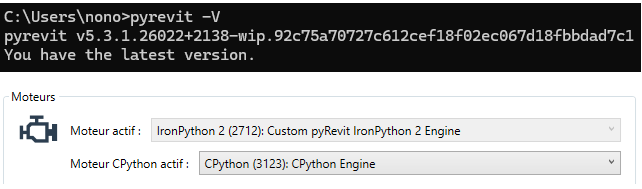
I have installed Revit 2025 and the latest version of pyRevit, as shown in the image below…I would like to activate the IronPython 3.4.2 engine in order to write my scripts using this engine. However, I am unable to activate it in the pyRevit settings, as the “Activate Engine” option is grayed out, and I don’t know how to configure or activate it using the pyRevit CLI?
You are right…I had to restart my computer and run cmd as administrator to be able to execute the command line…it works now and Ironpython 3.4.2 is the active engine! another question: since IronPython 3.4.2 is now the active engine, can I run my previous scripts that use IronPython 2.7 as-is, without changing anything in the script structure especially regarding WPF implementation? (I mean, can I use the same syntax as before to load and use WPF?)