First off, I am no programmer by any means. I’ve inherited a BIM Management role at my company and we have been using a customised clone of pyRevit located on a local server.
While I have been able to fix some issues that the users are having, one has stumped me for some time now. When I run pyrevit clones add <clone name> "<path>" it shows as a clone correctly in the CLI.
However, when I run pyrevit attach <clone name> default --installed --all users and check the attached clones it reads as something like this:
The clone name that gets reported does not match the expected clone name. The version that is being used is 5.1.0.25094+1133. It works on many other users machine’s no problem. The path is a server at our office. However when installing a pyRevit master on the machine directly, the attachment works no problem.
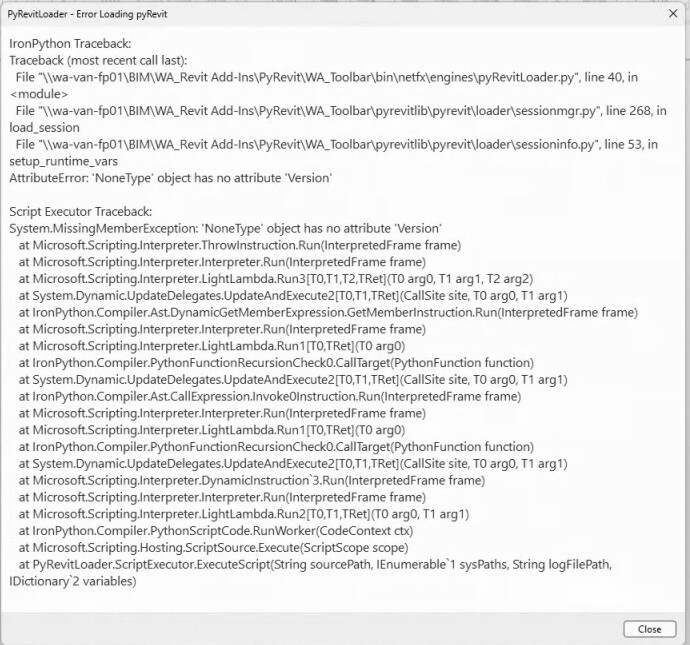
Below is a screenshot of the error message that comes up when opening up Revit, regardless of the year.
Well - line 53 is coming up and persona non grata. No attachment or no engine. (Last line.)
Not enough iinfo to answer your question - but if I had to guess -
pyRevitLoader.py is the wrong version or the pyRevit version is not for your version of Revit.
D*mn clones.
    if attachment and attachment.Clone:
        envvars.set_pyrevit_env_var(envvars.CLONENAME_ENVVAR, attachment.Clone.Name)
        envvars.set_pyrevit_env_var(
            envvars.IPYVERSION_ENVVAR, str(attachment.Engine.Version)
        )
Is what you’ve attached how it should look? If so, from what I can tell the code looks the same compared to a separate master file I have installed on my own workstation, and I do not have this issue.
This is also just a unique circumstance for this one user. Other users don’t have this same issue popping up. We are running Revit 2022, 2024, and 2026 without much complication (or at least not this type of error has been reported). To clarify as well, the Unnamed clone name and engine version issue applies to all Revit installations for this user, not just 2024.
If providing debug information would be helpful, which debug information should I provide? Through the attachment command?
No - the code is the code from pyRevit where your error is coming from.
If the others are working - you need to figure out what is different. All same pyRevit versions? All same python versions? .Net versions? etc, etc… Something is differnt.
Running pyrevit env on both machines and comparing the output may be a good start.
Runnint pyrevit attach with the --log flag may also help.
Also AllUsers indicates a admin install, which puts some stuff into ProgramData and is known to cause troubles on some machines. 6.5.5 tried to fix some of these issues.
Right, so I’ve created logs for both users, myself and for the user having the issue. I’ve also tried upgrading all our files to be 6.5.5. but still no dice. Based on the logs, it seems like the issue user has pyRevit refer to a config file located in the Program Data folder. Not sure if that is the issue or if I need to be looking elsewhere? I don’t see any wording saying “issue” or “invalid”.
Please have a look below and let me know if there’s anything else I should include.
Normal User Log
2026-10-13 11:08:15.5228|DEBUG|pyRevitLabs.PyRevit.PyRevitConfig|Config "environment:clones" = "{"WA_Toolbar":"\\\\wa-van-fp01\\BIM\\WA_Revit Add-Ins\\PyRevit\\WA_Toolbar"}"
2026-10-13 11:08:15.5488|DEBUG|pyRevitLabs.Common.Extensions.StringExtensions|Normalizing "\\wa-van-fp01\BIM\WA_Revit Add-Ins\PyRevit\WA_Toolbar"
2026-10-13 11:08:15.5488|DEBUG|pyRevitLabs.Common.Extensions.StringExtensions|Path is not local. Skipping normalization "\\wa-van-fp01\BIM\WA_Revit Add-Ins\PyRevit\WA_Toolbar"
2026-10-13 11:08:15.5488|DEBUG|pyRevitLabs.PyRevit.PyRevitClone|Searching for valid clones above: \\wa-van-fp01\BIM\WA_Revit Add-Ins\PyRevit\WA_Toolbar
2026-10-13 11:08:15.5488|DEBUG|pyRevitLabs.Common.Extensions.StringExtensions|Normalizing "\\wa-van-fp01\BIM\WA_Revit Add-Ins\PyRevit\WA_Toolbar"
2026-10-13 11:08:15.5488|DEBUG|pyRevitLabs.Common.Extensions.StringExtensions|Path is not local. Skipping normalization "\\wa-van-fp01\BIM\WA_Revit Add-Ins\PyRevit\WA_Toolbar"
2026-10-13 11:08:15.5488|DEBUG|pyRevitLabs.PyRevit.PyRevitClone|Checking pyRevit clone validity "\\wa-van-fp01\BIM\WA_Revit Add-Ins\PyRevit\WA_Toolbar"
Issue User Log
2026-10-13 11:03:05.5707|DEBUG|pyRevitLabs.PyRevit.PyRevitConfig|Config "environment:clones" = "{"WA_Toolbar":"//wa-van-fp01/BIM/WA_Revit Add-Ins/PyRevit/WA_Toolbar"}"
2026-10-13 11:03:05.6469|DEBUG|pyRevitLabs.PyRevit.PyRevitConfig|Try getting config as dict "environment:clones"
2026-10-13 11:03:05.6469|DEBUG|pyRevitLabs.PyRevit.PyRevitConfig|Try getting config "environment:clones"
2026-10-13 11:03:05.6469|DEBUG|pyRevitLabs.PyRevit.PyRevitConfig|Config "environment:clones" = "{"WA_Toolbar":"//wa-van-fp01/BIM/WA_Revit Add-Ins/PyRevit/WA_Toolbar"}"
2026-10-13 11:03:05.6469|DEBUG|pyRevitLabs.Common.Extensions.StringExtensions|Normalizing "C:\ProgramData\pyRevit\pyRevit_config.ini"
2026-10-13 11:03:05.6469|DEBUG|pyRevitLabs.Common.Extensions.StringExtensions|Normalized as "C:\ProgramData\pyRevit\pyRevit_config.ini"
2026-10-13 11:03:05.6469|DEBUG|pyRevitLabs.Common.Extensions.StringExtensions|Normalizing "C:\ProgramData\pyRevit\pyRevit_config.ini"
2026-10-13 11:03:05.6469|DEBUG|pyRevitLabs.Common.Extensions.StringExtensions|Normalized as "C:\ProgramData\pyRevit\pyRevit_config.ini"
2026-10-13 11:03:05.6469|DEBUG|pyRevitLabs.Common.Extensions.StringExtensions|Normalizing "//wa-van-fp01/BIM/WA_Revit Add-Ins/PyRevit/WA_Toolbar"
2026-10-13 11:03:05.6469|DEBUG|pyRevitLabs.Common.Extensions.StringExtensions|Path is not local. Skipping normalization "//wa-van-fp01/BIM/WA_Revit Add-Ins/PyRevit/WA_Toolbar"
2026-10-13 11:03:05.6603|DEBUG|pyRevitLabs.PyRevit.PyRevitClone|Searching for valid clones above: //wa-van-fp01/BIM/WA_Revit Add-Ins/PyRevit/WA_Toolbar
2026-10-13 11:03:05.6603|DEBUG|pyRevitLabs.Common.Extensions.StringExtensions|Normalizing "//wa-van-fp01/BIM/WA_Revit Add-Ins/PyRevit/WA_Toolbar"
2026-10-13 11:03:05.6603|DEBUG|pyRevitLabs.Common.Extensions.StringExtensions|Path is not local. Skipping normalization "//wa-van-fp01/BIM/WA_Revit Add-Ins/PyRevit/WA_Toolbar"
2026-10-13 11:03:05.6603|DEBUG|pyRevitLabs.PyRevit.PyRevitClone|Checking pyRevit clone validity "//wa-van-fp01/BIM/WA_Revit Add-Ins/PyRevit/WA_Toolbar"
(Disclaimer: this answer was drafted by deepwiki based on the pyRevit source code — please verify before applying in production.)
The Unnamed-XXXX name is a symptom, not the cause. When pyRevit can’t match the attached clone (from the pyRevit.addin manifest) to a registered clone by path, it builds a clone object straight from the manifest and gives it a generated Unnamed-<hash> name. And Engine: ? means the engine DLL path inside that manifest can’t be resolved. So on this machine, the attachment isn’t connecting to the registered clone.
The clone registry is per-user (%AppData%\pyRevit\pyRevit_config.ini, [environment] section), and pyRevit silently drops registered clones whose path can’t be verified for the current user. Things to check on the affected machine, as that user:
Compare paths. Open C:\ProgramData\Autodesk\Revit\Addins\<year>\pyRevit.addin (for --allusers attachments) or %AppData%\Autodesk\Revit\Addins\<year>\pyRevit.addin and look at the <Assembly> path. Then run pyrevit clones and compare the registered clone path. If one is a UNC path (\\server\share\...) and the other is a mapped drive (Z:\...), or differs in any way, that’s the mismatch. Re-register the clone using the exact same path form that appears in the .addin file.
Check access. Confirm the user can actually browse to the clone path and that bin\...\engines exists there with the engine DLLs. Engine: ? strongly suggests the engine file path in the manifest doesn’t exist or isn’t readable for that user (permissions on the share, or the share not mapped/mounted in their session).
Clean re-attach as the affected user. On the machine, logged in as that user:
Then pyrevit attached and confirm the name/engine now resolve. If you ran the original attach --allusers as an admin or a different account, the manifest may have been written with a path form valid for that account but not this user.
If it persists: run pyrevit env and pyrevit attached --debug and check %AppData%\pyRevit\ logs — the debug log will show whether the registered clone path failed verification (it gets pruned silently) or the engine lookup failed.
In short: the “Unnamed” label means pyRevit found the .addin file but couldn’t tie it to your registered clone — almost always a path mismatch (UNC vs mapped drive) or that user lacking access to the server path. Fix the path consistency and user access, then re-attach.