Hi everyone,
I am facing a persistent issue with pyRevit (version 6.4.0 and 6.3.0, I tried both) in Revit 2025.
If I install pyRevit without the developer extension, everything works perfectly. However, I explicitly need the Developer Extension for my work. When it is enabled, I get hit with a flood of error windows (dozens of pop-ups) every time I open a project.
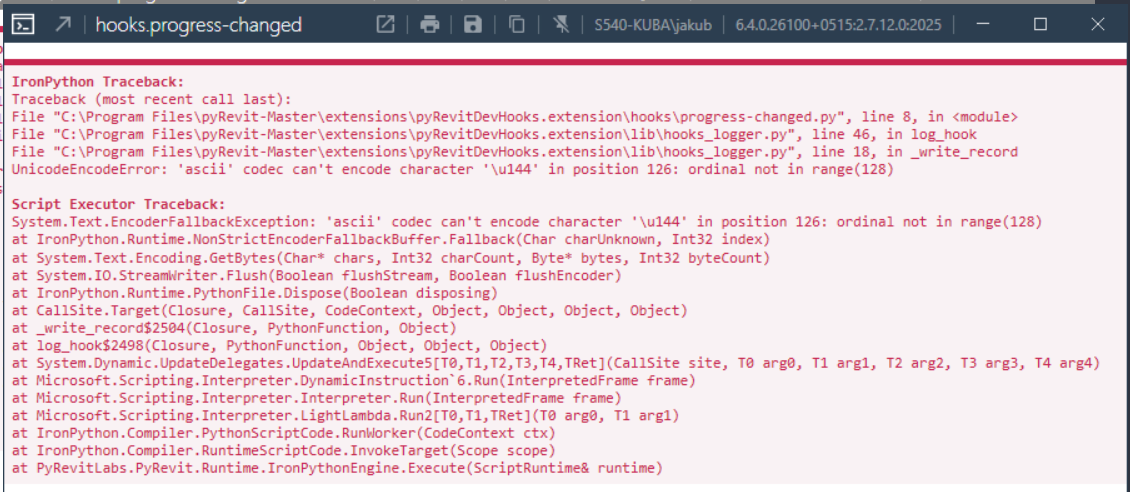
The console error points directly to pyRevitDevHooks and a coding conflict in the logger: UnicodeEncodeError: 'ascii' codec can't encode character '\u144' in position ... : ordinal not in range(128) It seems to fail inside hooks_logger.py at line 18 in _write_record during the progress-changed event.
What I have tried so far:
-
My PC region/language is set to Poland.
-
I tried the known Windows fix: I went to Control Panel → Region → Administrative → Change system locale and checked the “Beta: Use Unicode UTF-8 for worldwide language support” option. Unfortunately, it did not change anything, and the error still pops up constantly.
I am not a super advanced developer, so hacking deep into the internal core files is a bit overwhelming for me. Is there a simple way to fix this encoding issue or silence this specific progress logger so I can use the rest of the developer tools peacefully?
Any help would be highly appreciated. Thank you!