Just about done with this one. Shared Parameters 2.0 file format. Allowing comments, bindings and other features beyond the standard shared parameter file - but still 100% compatible.
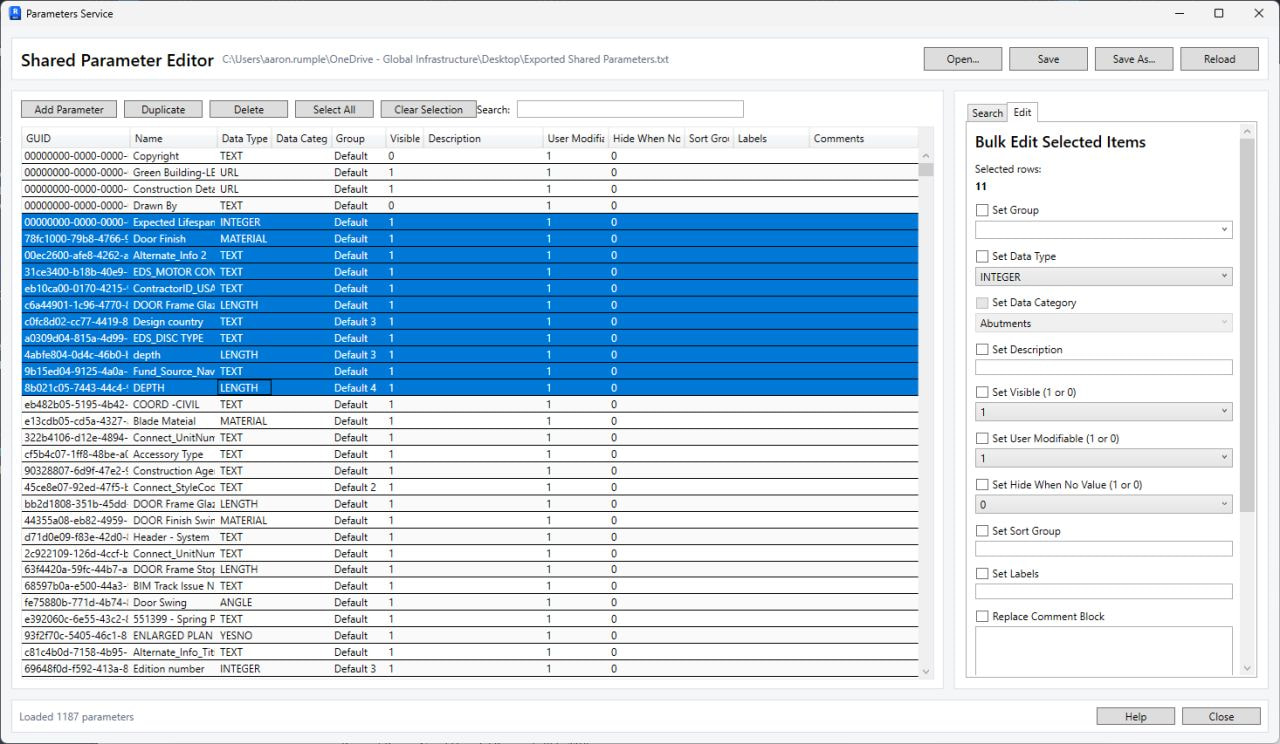
Making it public? Or just showing off 
 ?
?
Public as soon as I work out storing bindings and some other settings for downstream loading…
…and monthly ChatGPT allowance running low. Will have to go old school. '-)
So format for the New! Improved! Shared Parameters 2.0 is…
The SP file doesn’t care about comment lines. But we can.
And it doesn’t care about extra columns to the right. So more data.
Maybe something like this with features replicated with the cloud service - but for local use.
Guess I really should look closer at the cloud API… (ya - read the docs)
# This is a Revit shared parameter file.
# Do not edit manually. Ha!
# Shared Parameter File Format 2.0
# Created by: Aaron Rumple, AIA
# 2026
*META	VERSION	MINVERSION
META	2	1
*GROUP	ID	NAME
GROUP	1	Default
GROUP	2	pyRevit
*PARAM	GUID	NAME	DATATYPE	DATACATEGORY	GROUP	VISIBLE	DESCRIPTION	USERMODIFIABLE	HIDEWHENNOVALUE	TYPEINSTANCE GROUPTYPEINSTANCE	READONLY	COLLECTIONS	DATE	STATUS
#LABELS	00000000-0000-0000-0000-000000000001	Label A	Label B
PARAM	00000000-0000-0000-0000-000000000001	Copyright	TEXT		2	0		1	0	Type	INSTANCE	0	pyRevit	My Colelction	2026-01-01	?
#BIND	00000000-0000-0000-0000-000000000001	-200001
#BIND	00000000-0000-0000-0000-000000000001	-200002
#BIND	00000000-0000-0000-0000-000000000001	-200003
#BIND	00000000-0000-0000-0000-000000000001	-200004
#BIND	00000000-0000-0000-0000-000000000001	-200005
Hi, thanks for the great work! What do you mean here with Bindings?
Parameter Bindings define to what categories the parameters are attached. This is only available when loading the parameter or using the cloud Parameter Services. No when making a shared parameter file 1.0.
It is rather difficult list to programmatically collect available bindings properly. You can use AllowsBoundParameters, but it has to be a built in category and some subcategories - like wall sweeps - are also built in. And lines get goofy. You can bind to < Path of Travel Lines > - but no other. (I’d rally like to put parameters on other lines.)
But then you run into an issue - some categories only take instance parameters - like sheets. Others take both type and instance binding. And I haven’t yet figured out a good way to filter out how to cull categories like Sheets. One would think you could do just a test to see if you could bind to a category and rollback if that fails. But no…
For instance - you can attach a parameter to sheets by type - even tho sheets don’t have types. You’ll see the code below doesn’t fail (it probably should) From there you can even schedule it and stuff data in it. Maybe adsk plans sheet types in the future. Or they f’ed up.
So the only way I can see is to hard code those categories that are limited to instance bindings. Not really very good for future proofing code.
Long explanation - but what I’m dealing with on current project.
import clr

clr.AddReference("RevitAPI")
from Autodesk.Revit.DB import *

doc = __revit__.ActiveUIDocument.Document
app = doc.Application

# 1. Get the category for Sheets
category_set = app.Create.NewCategorySet()
sheet_category = doc.Settings.Categories.get_Item(
    BuiltInCategory.OST_Sheets
)
category_set.Insert(sheet_category)

# 2. Define whether it's Type or Instance binding
# Use TypeBinding for sheet types (or InstanceBinding for sheet instances)
binding = app.Create.NewTypeBinding(category_set)
#binding = app.Create.NewInstanceBinding(category_set) # alternative for instance

# 3. Get your ExternalDefinition from your opened Shared Parameter file
# (Assumes a shared parameter file is loaded and you have a valid definition object)
def_file = app.OpenSharedParameterFile()
def_group = def_file.Groups.Item["Default"]
definition = def_group.Definitions.Item["Test"]

# 4. Insert binding inside a transaction
t = Transaction(doc, "Attach Project Parameter to Sheets")
t.Start()
try:
  # For Revit 2024+, use GroupTypeId instead of BuiltInParameterGroup if needed
  # Or use doc.ParameterBindings.Insert(definition, binding, BuiltInParameterGroup.PG_DATA)
  doc.ParameterBindings.Insert(definition, binding)
  t.Commit()
  print("Parameter successfully attached to sheets!")
except Exception as e:
  t.RollBack()
  print("Failed to attach parameter: {}".format(e))
@Revitalize wrong thread…
Make a new thread and delete this post
And if you want to ping the person that remade the keynote manager, that @tayOthman.
Better… Create a feature request on GitHub