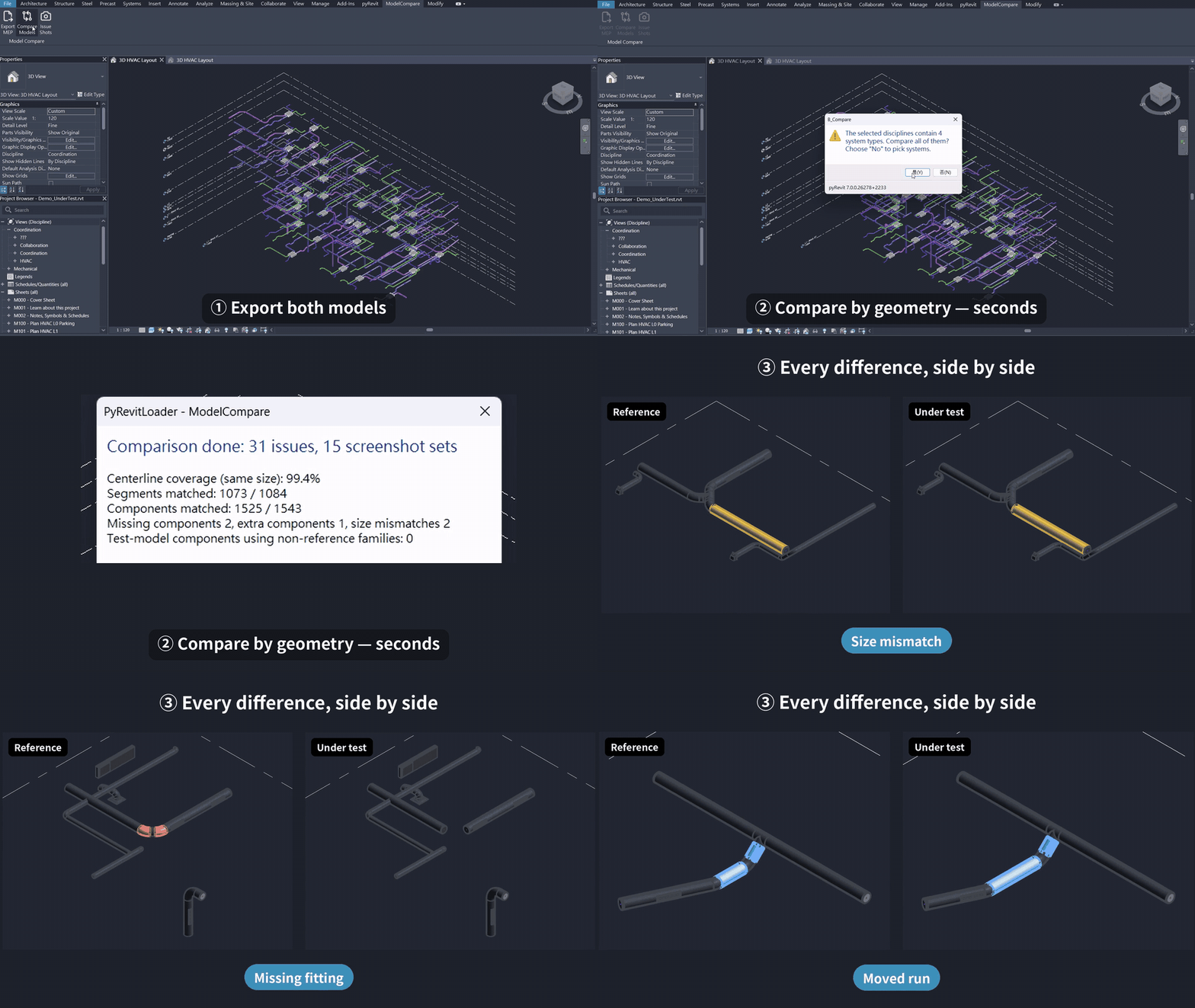
Two Revit models. Same building, built independently.
How different are they, really?
That’s the question I got stuck on while evaluating an auto-modeling plugin. Navisworks and ACC compare by ElementId, so two independently built models are 100% “different”. Not helpful.
So I built Revit Model Compare. It ignores IDs and matches elements by where they actually are.
Three buttons:
- Export MEP: run it in each model, dumps ducts, pipes, cable trays, conduits and their fittings to CSV.
- Compare: matches segments by both endpoints (direction doesn’t matter) and components by insertion point. It never matches across disciplines. Every element ends up as match, minor offset, moved, wrong size, wrong type, missing or extra. You also get a centerline coverage number: how much of the reference routing the other model reproduces.
- Issue Shots: run it in both models and it creates a section-boxed 3D view for every issue, with the problem elements colored and everything else greyed out. Same box in both models, so the images line up side by side.
I tested it by taking the Snowdon Towers HVAC sample, copying it, and quietly breaking things: resized ducts, deleted fittings, shifted a run by 20 mm. Checked against the real ElementIds, it caught every change, with zero false positives.
A few nerdy bits:
- The compare core is plain Python that runs on both IronPython 2.7 and CPython 3, so the tests run in CI without Revit.
- A few thousand elements compare in well under a second (grid index + greedy nearest pair).
- Halftone alone doesn’t hide system colors in screenshots, so other elements get a solid grey override.
- The UI is English or Traditional Chinese, following your pyRevit language setting.
What it doesn’t do (yet):
- Only tested on Revit 2024 / pyRevit 7. Other versions should work, but I haven’t checked. Reports welcome.
- It compares geometry, size, family and type. It doesn’t compare other parameter values.
- Tolerances are fixed in code (5 mm exact, 50 mm offset, 1 m for “moved”).
Maybe V2 makes those configurable. For now it’s V1, MIT licensed, and I’d love to hear where it breaks.