yshina
(yshina)
1
Hi everyone,
My PyRevit custom layout isn’t displaying in the order specified in my bundle.yaml file. The panels load correctly but ignore the layout sequence.
My bundle.yaml:
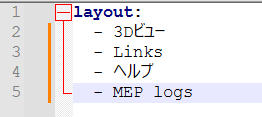
Setup:
- Japanese panel names
- UTF-8 encoding
- Folder names match layout entries exactly
- No PyRevit errors
Tried:
- Verified YAML syntax
- Reloaded PyRevit
- Restarted Revit
Panels work fine but appear in wrong order. Anyone experienced this with non-English characters or have troubleshooting suggestions?
Thanks!
Lucien
(Lucien Zenners)
2
Hello everyone,
I have the same problem. I tried to use [afterall:], [before:<other bundle name>] as well but nothing seeme to work.
My original bundle.yaml file looks like this:
layout:
- Linien
- KoordinatenPruefen
I tried the following bundle.yaml, but it did not work either:
layout:
- Linien[before:KoordinatenPruefen]
- KoordinatenPruefen
My folder structure looks like this:
test.tab
|--test.panel
|--KoordinatenPruefen.pushbutton
|--Linien.pulldown
|--bundle.yaml
Cheers,
Lucien