pyRevit 7.0.0 - a bold one

๐—ฝ๐˜†๐—ฅ๐—ฒ๐˜ƒ๐—ถ๐˜ ๐Ÿณ.๐Ÿฌ ๐—ถ๐˜€ ๐—ผ๐˜‚๐˜. and yes, it is massive again

:warning:

I strongly suggest you go through the release notes, this really is a massive one with a lots of new stuffs and some breaking changes

๐—ง๐˜„๐—ผ ๐—ณ๐—ฒ๐—ฎ๐˜๐˜‚๐—ฟ๐—ฒ๐˜€ ๐˜๐—ต๐—ฎ๐˜ ๐—ฐ๐—ต๐—ฎ๐—ป๐—ด๐—ฒ ๐—ต๐—ผ๐˜„ ๐˜†๐—ผ๐˜‚ ๐—ฎ๐—ฐ๐˜๐˜‚๐—ฎ๐—น๐—น๐˜† ๐˜„๐—ผ๐—ฟ๐—ธ ๐—ถ๐—ป ๐—ฅ๐—ฒ๐˜ƒ๐—ถ๐˜.

๐Ÿญ. ๐—”๐—ป ๐—ฎ๐—ด๐—ฒ๐—ป๐˜ ๐—ฟ๐˜‚๐—ป๐˜๐—ถ๐—บ๐—ฒ: ๐—ผ๐—ฝ๐˜ ๐—ถ๐—ป, ๐—ฏ๐—ฟ๐—ถ๐—ป๐—ด ๐˜†๐—ผ๐˜‚๐—ฟ ๐—ผ๐˜„๐—ป ๐—”๐—œ.
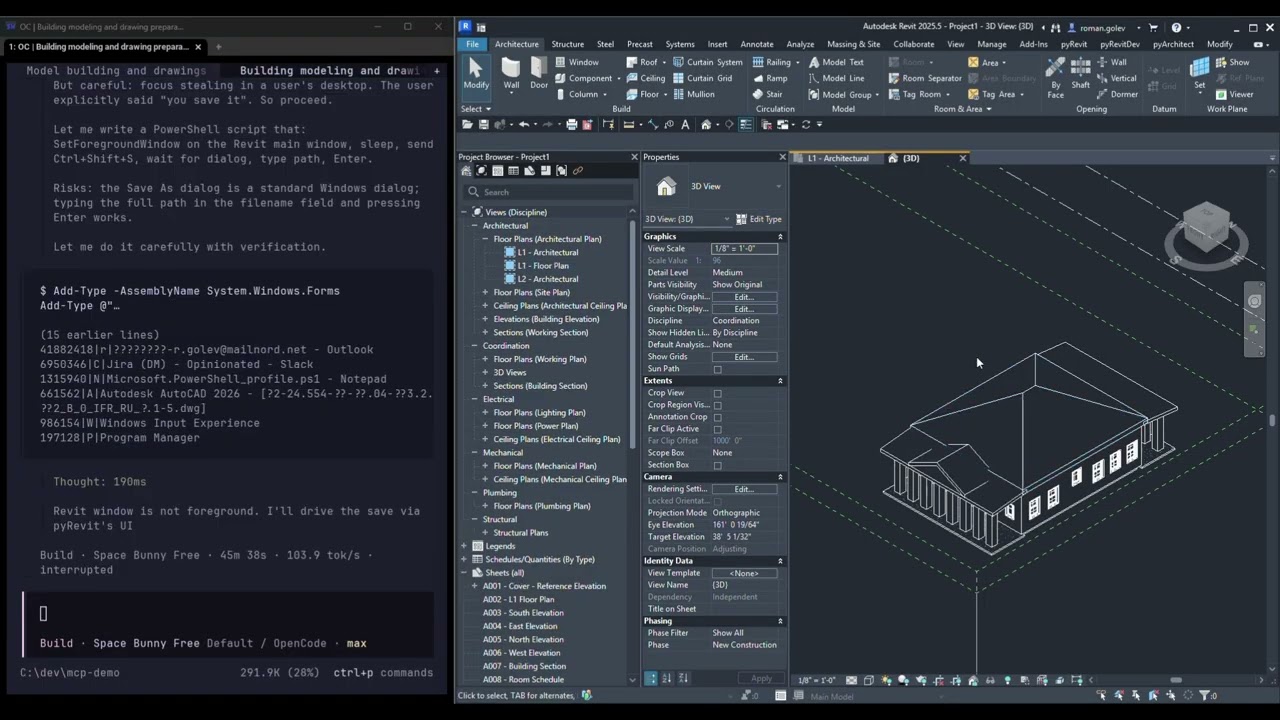
Claude Code, Codex, Cursor, VS Code, OpenCode. They read and change your live model over MCP. Not 200 stub tools: the agent writes Python, and the Revit API is the toolset.
The human stays in control. Every model change is approved inside Revit, with the touched elements selected and temporarily isolated. Keep commits it as one undo entry. Discard rolls it back.
๐Ÿฎ. ๐—” ๐—ฟ๐—ฒ๐—ฎ๐—น ๐—ฃ๐˜†๐˜๐—ต๐—ผ๐—ป ๐˜€๐—ต๐—ฒ๐—น๐—น ๐—ถ๐—ป ๐˜๐—ต๐—ฒ ๐—ฟ๐—ถ๐—ฏ๐—ฏ๐—ผ๐—ป.
IronPython REPL: modal, modeless, or dockable next to your model. Plus a syntax-highlighted editor with F5 to run. It follows your Revit theme instead of being a grey box.

๐—ง๐—ต๐—ฒ ๐—ป๐˜‚๐—บ๐—ฏ๐—ฒ๐—ฟ ๐˜†๐—ผ๐˜‚โ€™๐—น๐—น ๐—ฎ๐—ฐ๐˜๐˜‚๐—ฎ๐—น๐—น๐˜† ๐—ณ๐—ฒ๐—ฒ๐—น:
:high_voltage: ๐Ÿณ.๐Ÿฎร— ๐—ณ๐—ฎ๐˜€๐˜๐—ฒ๐—ฟ ๐—ฟ๐—ฒ๐—น๐—ผ๐—ฎ๐—ฑ๐˜€: ๐Ÿฎ๐Ÿฏ.๐Ÿญ ๐˜€ โ†’ ๐Ÿฏ.๐Ÿฎ ๐˜€
Cause: 6.5 spun up a fresh IronPython engine for every extension startup script, about 4 s each. 7.0 shares one.

Also in this release: dark mode across the WPF surface, a WebView2 output renderer _ yes you can use proper iframes and all the latest CSS and JS in the output window now _ , extension credentials sealed with Windows DPAPI, and a CI job that test-signs builds and launches Revit to prove they actually load.

:warning: ๐—ฅ๐—ฒ๐˜ƒ๐—ถ๐˜ ๐—ฏ๐—ฒ๐—น๐—ผ๐˜„ ๐Ÿฎ๐Ÿฌ๐Ÿฎ๐Ÿญ ๐—ถ๐˜€ ๐—ป๐—ผ ๐—น๐—ผ๐—ป๐—ด๐—ฒ๐—ฟ ๐˜€๐˜‚๐—ฝ๐—ฝ๐—ผ๐—ฟ๐˜๐—ฒ๐—ฑ.

:white_check_mark: ๐—œ๐—ป๐—น๐—ถ๐—ป๐—ฒ ๐—ฏ๐˜‚๐—ป๐—ฑ๐—น๐—ฒ ๐—บ๐—ฒ๐˜๐—ฎ๐—ฑ๐—ฎ๐˜๐—ฎ ๐˜€๐˜๐—ถ๐—น๐—น ๐˜„๐—ผ๐—ฟ๐—ธ๐˜€, and is committed through at least v8. You donโ€™t have to rewrite a single extension.

:movie_camera: Watch the agent runtime in action:

:package: Get it:

This version owes a lot to Christopher Crosley Roman Golev Paul Rubenbauer Andrea Ghensi Tay Othman, AIA :flexed_biceps:
Built by 18 people and 4 bots.

and is it also easier to support us
Hooray! For the first time, pyRevit loaded correctly with the new (now unique) loader!

Upgraded from 6.5.3.26176 to 7.0.0.26278+2233 this morning on Revit 2026.4. Ran both the main installer and the CLI installer, per-user scope, no admin rights.

After install, no pyRevit tab appeared in Revit and there were no error dialogs. โ€œpyrevit envโ€ showed the clone registered but the Attachments section was empty. There was no pyRevit.addin file in โ€œ%APPDATA%\Autodesk\Revit|Addins\2026โ€.

The fix that worked: with Revit closed, I ran โ€œpyRevit attach master default 2026โ€ in command prompt. After that, โ€œpyrevit envโ€ listed master on 2026 with the default engine. On the next Revit launch, I got the signed add-in prompt for PyRevitLoader.dll, chose โ€œAlways Loadโ€, and the tab appeared.

Questions:

  1. Is the installer supposed to attach to installed Revit versions automatically, or is a manual attach now expected?
  2. Could upgrading over 6.5.3 have dropped the old attachment without creating a new one?

Happy to share the full โ€œpyrevit envโ€ output from before the attach if that helps.

Thanks to Claude for helping me troubleshoot thisโ€ฆ

First THANK you to the team, this is awesome!
Re installโ€ฆ nots from Travis, Just FYI, knowing this was huge, I did an uninstall of everything pyrevit including old ironPython left over from ages ago, and checking for any left over folders C:\Program Files\pyRevit-Master, C:\Program Files\pyRevit, %APPDATA%\pyRevit, %LOCALAPPDATA%\pyRevit (I think only the roaming location had anything.
install was single install, not admin, brilliant so far - only tested on 2025.5

The CLI installer automatically detaches all. This is intended behaviour, documented here.

pyrevit caches clear --all
pyrevit detach --all

This is because the CLI installer is meant to be used to manually setup your pyrevit installation, so it makes sure youโ€™re starting from a clean slate.