Pyrevit 6.4.0 release
Thanks to @Wurschdhaud, @tay0thman, @dnenov, @thumDer, @Denver-22, @OnePowerUser88, @vinnividivicci, @sweco-beb283, @jchristel, @924312, @jmcouffin, @thanhtranarch for the support, issue management, improvements and fixes.
Installers
pyRevit
- pyRevit 6.4.0 EXE (preferred)
- pyRevit 6.4.0 Admin EXE
CLI
- pyRevit CLI EXE(preferred)
Following installers are available at bottom of the page:
- pyRevit CLI Admin EXE
- pyRevit CLI Admin MSI
Highlights
- Match History Clipboard: Dockable pane storing up to 50 parameter name/value pairs with regex search, three load sources (element picker, view filters, eyedropper), three paste modes, category filtering — plus color value pick improvements and richer filter visualization. (#3185, #3197, #3206, #3280)

- Pick Elements by Parameter Value: New selection tool — pick a reference element, choose parameters, and rectangle-select matching elements; shift-click requires all values to match. (#3200)
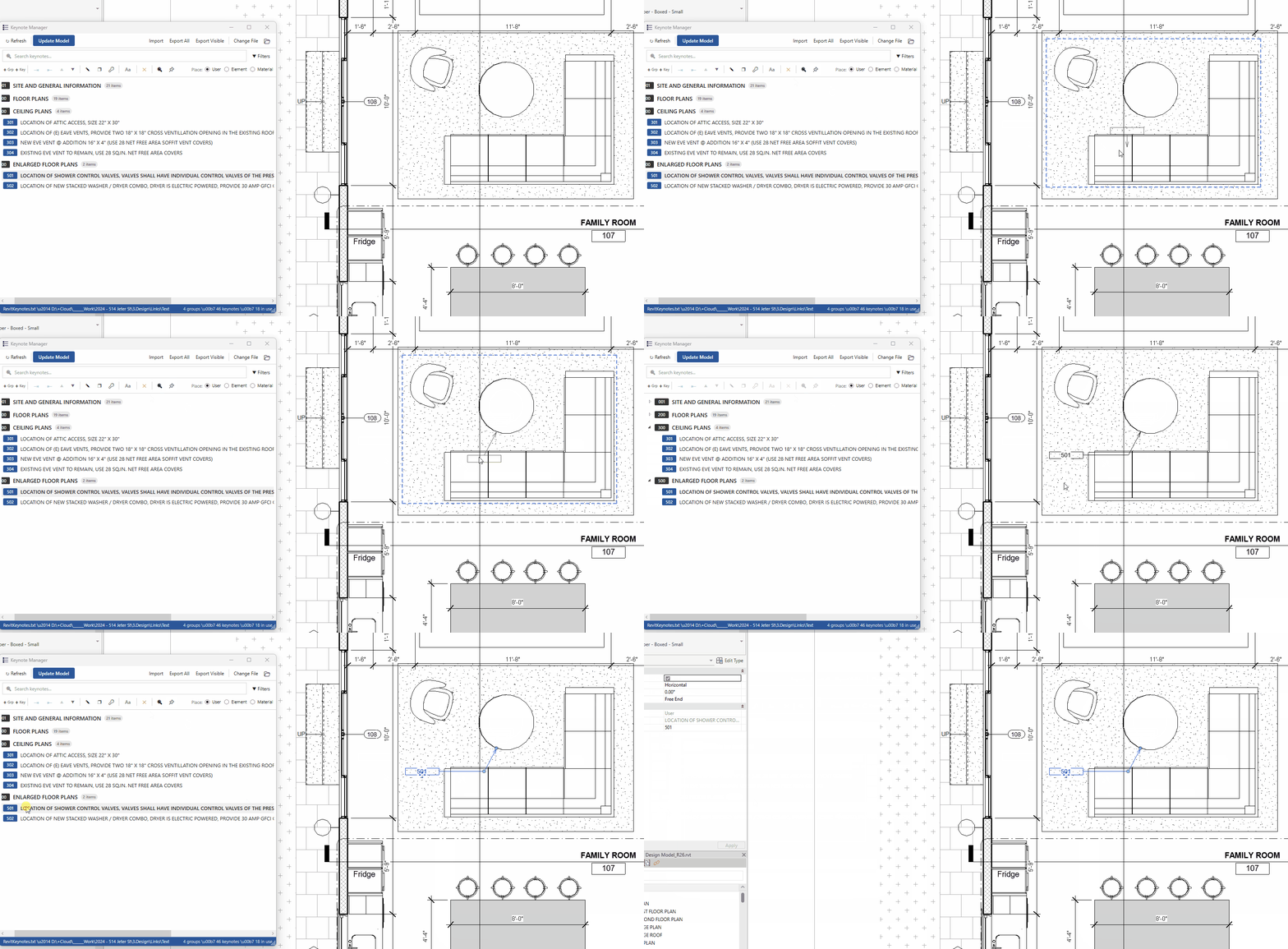
- Keynote Manager overhaul: Modeless window, unified tree with drag-and-drop, text case conversion menu, debounced search, and ADC compatibility fix. (#3136)
- View Range Editor: Warns when view range is template-driven; edits apply directly to the view template. (#3155, #3192)
- Rocket Mode: New
rocket_modeconfig option skips icon pre-loading for faster startup. (#3121) - Revit 2027 support: Addin manifest path fix, updated hosts list, and ADC v2027 compatibility with three-tier filesystem fallback for .NET 8. (#3277, #3266)
- C# Loader performance: Loader now matches legacy IronPython load times — config and metadata caching, reduced per-file I/O, and icon pre-loading removed from the hot path. (#3268, #3270)
- C# Loader reliability: Multi-pass loading restored, digit-prefixed class name fix, duplicate class deduplication, version filtering, layout allowlist, F1 help parity, and WndProc crash fix. (#3188, #3179, #3111, #3134, #3281)
- WPFPanel parity:
_WPFMixinshared byWPFWindowandWPFPanel; panels now supportload_xaml()with locale and resource dictionaries. (#3177, #3146) - IFC export helper:
ifc.pyextended with config loader, export-options builder, and single-callIFCExporter. (#3147) - Output window: Ctrl+C and Ctrl+A keyboard shortcuts in ScriptConsole; fixed pyRevit/IronPython version showing “Unknown” on startup. (#3258, #3260, #3262)
- UpdaterListener: Now triggers on element addition and deletion, not just modification. (#3139)
- Logging level fix: pyRevit logging enum correctly translated to Python scale — no more unwanted console output on startup. (#3207)
Changes by Folder / Tool
extensions/pyRevitTools.extension
Match, Pick, Selection, ViewRange, Keynote, SectionBox, ColorSplasher, ReNumber, Measure
- Match History Clipboard: Persistent dockable pane with clipboard history, regex search, element/filter/eyedropper load sources, three paste modes, category awareness; companion Match Value Picker tool; shared
lib/match/library eliminating duplication. Color value pick now stores ElementId in a unified format; color helpers added tofilter_utilsfor better filter detection and warning bar color control. (#3185, #3197, #3206, #3280) - Pick Elements by Parameter Value: Rectangle-based selection filter matching parameter values from a reference element; shift-click mode for multi-parameter matching;
ParamDefextended with value badge and tooltip fixes. (#3200) - Keynote Manager: Modeless window architecture, unified hierarchical tree with drag-and-drop, text formatting menu (UPPER/lower/Title/Sentence), debounced search, UUID-based temp keys, null-safety, ADC ReadOnlyList monkey-patch. (#3136)
- View Range Editor: Template-driven warning dialog before editing; edits applied to the view template directly; correct level ID handling for templates vs views. (#3155, #3192)
- Section Box Navigator: Store set values across doc switching; levels-at-0 fix; additional bugfixes for document switching (#3145, #3130, #3261)
- Temp View mode: Warning displayed when the view phase is not changeable. (#3274)
- ReNumber: Shift+Click duplicate handling; restore non-integer support; switch to
EXEC_PARAMS.config_mode. (#3127, #3120, #3125) - 3D Measure: Improvement pass. (#3124)
- Convert CAD Import: Robustness improvements for FreeForm/DirectShape conversion. (#3126)
- ColorSplasher / Isolate: Visually distinct color generator added to lib. (#3165)
- ViewRange tool: Prevent duplicate windows, close crash fix, invalid value validation, DirectContext3D race condition fix, engine config correction. (#3240)
- Copy Sheets: Preserve view title position and extent when copying sheets. (#3186)
- ws4links: Script update. (#3143)
extensions/pyRevitCore.extension
Extensions, Settings
- Settings window: Section headers, separators, and slider control added. (#3132)
- Load Beta Tools: Fix setting + HelpUrl support improvement. (#3116)
extensions/pyRevitDevTools.extension
- Developer Sample Panel: Full-featured WPF pane example with inline docs, XAML, and locale resource dictionaries. (#3177)
- IFC export test script: Folder/config picker and output panel logging. (#3147)
extensions/extensions.json
- T3LabLite extension added. (#3208)
pyrevitlib/pyrevit/forms
_WPFMixinrefactor: Shared WPF behavior (resources, locale, UI helpers, dispatcher) extracted;WPFPanelbrought to feature parity withWPFWindowviaload_xaml(); resource setup ordering fixed. (#3177, #3146)StaticResourcecrash fix in forms loader. (#3123)- CPython compat fix. (#3115)
select_parameters: Enriched with current value display and richer metadata;ParamDefextended;ParameterItemStyle.xamlupdated with value badge. (#3200)- Locale-specific copied view detection fix. (#3175)
pyrevitlib/pyrevit/revit
query.py:get_name()updated with worksets support. (#3187)events.py:UpdaterListenernow registers element addition and deletion triggers. (#3139)
pyrevitlib/pyrevit — Lib Utilities
ifc.py: Extended withload_config(),build_export_options()(decimal-separator workaround), andIFCExporterclass. (#3147)- Distinct color generator: Greedy max-distance RGB algorithm, IronPython 2.7 compatible, deterministic seed support. (#3165)
elements_bounding_box: Optional elements argument forget_value_range. (#3128)Mesh: Optional color override forMesh.from_solid. (#3169)
pyrevitlib/pyrevit/routes
- Safe JSON serializer: Unicode-safe fallback for IronPython 2.7; handles NaN/infinity as null; float edge cases. (#3161)
- Content-Length fix: Consistent byte encoding and single accurate header, fixing issues with Routes in localized Revit. (#3161)
dev/pyRevitLoader — C# Loader / Session Manager
- Performance: Cached
PyRevitConfig.Load()as a static singleton, cached RoslynMetadataReferencelist, replaced per-extensionAppDomainscans with pre-builtHashSetlookup — loader now matches legacy load times. (#3268, #3270) - WndProc fix: Pre-cached .NET types restored to prevent IronPython crash in dockable pane message handling. (#3281)
- Multi-pass loading restored: All extension assemblies load before startup scripts execute, fixing cross-extension imports. (#3188)
- Digit-prefixed class names: Underscore prefix for names starting with digits (invalid C# identifiers). (#3188)
- Duplicate class deduplication: HashSet guard prevents Roslyn CS0101 errors. (#3188)
- Layout allowlist:
layoutfield inbundle.yamlnow acts as a strict allowlist, matching Python loader. (#3111) - F1 help parity: Template substitution, auto-discovery, relative path resolution for help URLs. (#3111)
- Revit version compatibility:
min_revit_version/max_revit_versionfiltering at extension and component level. (#3134) - Dynamo engine defaults:
automateandcleandefault tofalse. (#3179) - SVG icon filtering:
BitmapImageskips SVG, prefers raster formats. (#3179) - Environment variable expansion:
%USERPROFILE%and similar variables resolved in extension paths. (#3179) - Logging level translation: pyRevit enum mapped to Python logging scale (Quiet=WARNING, Verbose=INFO, Debug=DEBUG). (#3207)
- Rocket Mode:
rocket_modeconfig skips icon pre-loading for faster startup. (#3121) - AppDomain session environment dictionary populated. (#3122)
- Command Control Id exposed in session manager. (#3133)
- Toolbar disappearing fix after reload when tabs are renamed. (#3183)
SPECIAL_CHARSsanitization restored inSanitizeClassName. (#3184)- Docstring and tab visibility logic enhanced. (#3190)
- MinifyUI state desync fix on cross-model view switch. (#3196)
- Extension install path fix (not changeable). (#3198)
_script/.script.pyfile extensions allowed. (#3131)- Ribbon fixes: Tab downgrade, combobox crash, keys/values return, tooltip error message. (#3202)
- Version display fixed: pyRevit and IronPython version no longer shows “Unknown” in output window. (#3260, #3262)
dev/pyRevitLabs (TargetApps.Revit, Runtime, CommonUtils)
- Revit 2027 addin path: Fixed all-users addin manifest path for Revit 2027+. (#3277)
- ADC v2027 compatibility: Three-tier filesystem fallback for
.NET 8when ADC removed the compatible API DLL — Public API → Legacy API → process detection + workspace directory walking. (#3266) - Storage file handling: Refactored to use
RootStorageclass with improved stream reading and error handling (OpenMCDF v3). (#3244) - LoadBeta config: Canonical
loadbetakey with legacyload_betafallback;IniRemoveKeyadded. (#3269) - Extension path handling: Offline path preservation fixed; case-insensitive path deduplication on Windows. (#3259)
- Dependency resolution: Improved
.NET Coreassembly resolution to prevent loading conflicts. (#3255) - Dependency updates: YamlDotNet v16, OpenMCDF v3, ControlZEx v7, NUnit v4, libgit2sharp 0.31.0, Microsoft.CodeAnalysis 4.11.0.
ScriptConsole / Output Window
- Ctrl+C / Ctrl+A shortcuts: Copy selection and select-all now work in the ScriptConsole output window. (#3258)
dev/pyRevitTelemetryServer
- Go dependency updates:
go-sql-driver/mysql,go-sqlite3,lib/pq,gorilla/mux,gofrs/uuid,posener/complete v2,edwards25519.
Docs / CI / Build
pyrevit-hosts.json: Revit 2023.1.9, 25.4.41.14, and 2027 versions added.- Python version updated to 3.14 in Pipfile.
- GitHub Actions: Workflow improvements, trusted-signing-action updates, release process enhancements.
Full PR List
| PR | Title | Author |
|---|---|---|
| #3111 | Layout allowlist + F1 help parity with Python loader | @OnePowerUser88 |
| #3115 | Fix CPython compat | @Wurschdhaud |
| #3116 | Fix load beta tools setting + HelpUrl support | @OnePowerUser88 |
| #3119 | Update translations for Create Workset For Linked Element | @Denver-22 |
| #3120 | Restore non-integer support in ReNumber tool | @Wurschdhaud |
| #3121 | Add Rocket Mode configuration | @jmcouffin |
| #3122 | Populate AppDomain session environment dictionary | @jmcouffin |
| #3123 | Fix StaticResource crash in forms loader | @Wurschdhaud |
| #3124 | Improvement 3dmeasure | @Wurschdhaud |
| #3125 | Switch shiftclick to EXEC_PARAMS.config_mode | @Wurschdhaud |
| #3126 | Convert CAD Import robustness improvements | @Wurschdhaud |
| #3127 | Add Shift+Click duplicate handling to ReNumber | @Wurschdhaud |
| #3128 | Add optional elements argument to get_value_range | @Wurschdhaud |
| #3130 | Fix SectionBoxNavigator: Levels at 0 | @Wurschdhaud |
| #3131 | Allow _script, _script and .script.py extensions | @sweco-beb283 |
| #3132 | Add section headers, separators, slider to settings | @Wurschdhaud |
| #3133 | Expose Command Control Id in Session Manager | @sweco-beb283 |
| #3134 | Implement Revit version compatibility checks | @jchristel |
| #3136 | Keynote Manager: Fix ADC bug + New UI | @tay0thman |
| #3139 | Add element addition/deletion triggers to UpdaterListener | @dnenov |
| #3143 | Update ws4links_script.py | @Denver-22 |
| #3145 | Enhance SB Navigator - store set values, doc switching | @Wurschdhaud |
| #3146 | Fix WPF Pane implementation | @Wurschdhaud |
| #3147 | Extend ifc.py - extended IFC export helper | @Wurschdhaud |
| #3155 | Warn users when view range is driven by view template | @thumDer |
| #3161 | Safe JSON serializer and content-length fix | @vinnividivicci |
| #3162 | Update pyrevit-hosts.json - add Revit 25.4.41.14 | @924312 |
| #3165 | Add visually distinct color generator | @Wurschdhaud |
| #3169 | Add optional color override to Mesh.from_solid | @Wurschdhaud |
| #3175 | Fix locale-specific copied view detection | @Wurschdhaud |
| #3176 | Update Python version to 3.14 | @jmcouffin |
| #3177 | Extract _WPFMixin, bring WPFPanel to feature parity | @Wurschdhaud |
| #3179 | Fix loader regressions (Dynamo, SVG, env vars, version) | @tay0thman |
| #3180 | Update pyrevit-hosts.json - 2023.1.9 | @924312 |
| #3183 | Fix toolbar disappearing after reload with renamed tabs | @tay0thman |
| #3184 | Restore legacy SPECIAL_CHARS sanitization | @tay0thman |
| #3185 | Match prop clipboard pane | @Wurschdhaud |
| #3186 | Preserve view title position when copying sheets | @tay0thman |
| #3187 | Update get_name() with worksets support | @Denver-22 |
| #3188 | Fix C# loader regressions (multi-pass, digits, dupes, version) | @tay0thman |
| #3190 | Fix docstring and enhance tab visibility logic | @tay0thman |
| #3192 | Explicit update of the view template | @thumDer |
| #3196 | Fix MinifyUI state desync on cross-model view switch | @tay0thman |
| #3197 | Make use of improved lib in match clipboard pane | @Wurschdhaud |
| #3198 | Fix extension install path not changeable | @tay0thman |
| #3200 | Add Pick Elements by Parameter Value tool | @Wurschdhaud |
| #3202 | Fix tab downgrade, combobox crash, keys/values, tooltip error | @Wurschdhaud |
| #3206 | Clipboard improvements | @Wurschdhaud |
| #3207 | Fix logging level translation to Python scale | @tay0thman |
| #3208 | Add T3LabLite extension | @thanhtranarch |
| #3240 | Fix ViewRange: duplicate windows, close crash, invalid values | @tay0thman |
| #3244 | Refactor storage file handling in CommonUtils | @jmcouffin |
| #3258 | Add Ctrl+C and Ctrl+A keyboard shortcuts to ScriptConsole | @tay0thman |
| #3259 | Fix extension path offline path handling regressions | @tay0thman |
| #3260 | Fix pyRevit/IPY version showing Unknown in output window | @tay0thman |
| #3261 | Bugfixes for SectionBox Navigator | @Wurschdhaud |
| #3262 | Fix IronPython version showing Unknown in output window | @tay0thman |
| #3265 | Fix crash when processing inverted parameter filter rules | @Wurschdhaud |
| #3266 | ADC v2027 compatibility — filesystem fallback for .NET 8 | @tay0thman |
| #3268 | Optimize C# loader to match legacy load times | @tay0thman |
| #3269 | Fix LoadBeta configuration handling in PyRevitConfig | @jmcouffin |
| #3270 | Apply C# loader performance optimizations | @tay0thman |
| #3274 | Add warning for view phase not changeable in temp view mode | @Wurschdhaud |
| #3277 | Fix all-users addin manifest path for Revit 2027+ | @tay0thman |
| #3280 | Improve Match Clipboard color value pick and filter detection | @Wurschdhaud |
| #3281 | Restore WndProc pre-cached .NET types to prevent IronPython crash | @tay0thman |
Contributors
@vinnividivicci, @924312, @jchristel, @dnenov, @jmcouffin, @tay0thman, @Denver-22, @thumDer, @sweco-beb283, @OnePowerUser88, @Wurschdhaud, @thanhtranarch

 Persistent clipboard history
 Search with regex support
 Three load sources — think eyedropper
 Four-column list with category awareness
 Three paste modes