Parameter Pusher — The Big Hammer
This is a very big hammer. Bam!
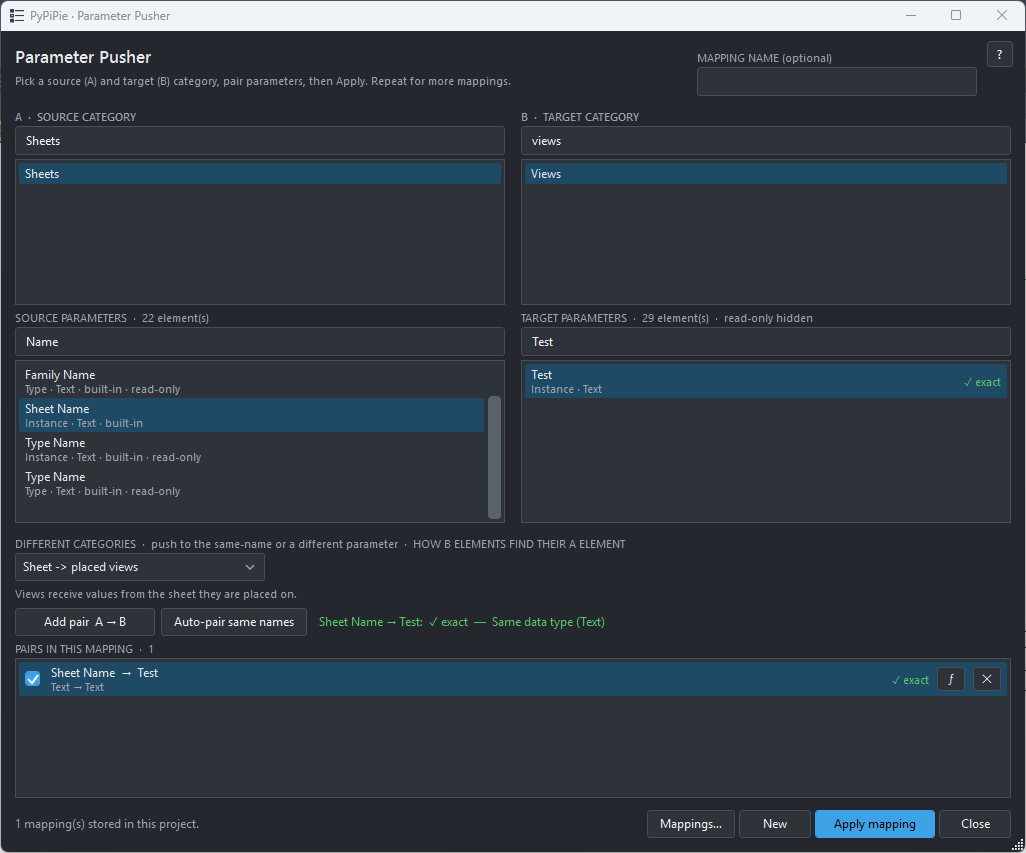
Parameter Pusher is a tool that can push parameter values from any element to any other element, and from one parameter to another.
It’s developed as a hook, so it can run automatically on Sync, Save, Before Print, and Before Export. It can also be run manually.
But it does more than just push a parameter from Point A to Point B. It also supports data conversion, so a dimension can be pushed into a text parameter, or even into a Yes/No parameter with a little magic.
The magic? Python.
You can write custom rules using common Python syntax to control how values are evaluated, converted, and pushed. (Cool, eh?)
Settings? They’re stored directly in the Revit project using Extensible Storage.
Need the same setup in another project? Just export your settings and rules, then import them into the other project.
Rules can also be individually enabled or disabled. Maybe you need this one tomorrow and that one today. No problem.
As I said, this is a big-ass hammer, so use it with caution.
And remember, this is V1. Initial small-scale testing has been positive, but I haven’t pushed the rules engine or data conversion capabilities particularly hard yet.
I also haven’t added parameter merging, which could be pretty cool. It is a stand alone extension right now for testing. I’ll roll it into my other tools down the road.
Next step is to put in some filtering so I can more accurately target items. (Like this door > this wall) Right now it is a project level pusher.
Maybe V2.
For now, swing carefully.