Hi, everyone - my 1st post here, raving about these tools available in Pyrevit, that make all of our lives much easier!
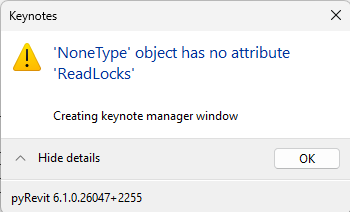
I do have an issue though - everytime my PC tries editing the keynotes for the office, my machine gives me this message.
I tried saving the file in the desktop to see if it would be a network issue, no go.
I tried converting the file to UTF-8 No BOM and with BOM and all other formats possible with notepad, and no luck:
I tried converting the actual keynote file when Keynote Mgr offers to try and convert the file, but it refused, so no luck.
This is the latest version of the PyRevit addin - I’d really appreciate whether you can shed some light on this issue…
All other Revit open the keynotes, both networked and locally, just mine is acting up - Otherwise Revit looks fine and works fine.
If you fellows can’t help, I will try reinstalling REVIT.
Thank you everyone - If you need any specific log file for diagnostics let me know where to find it please.
Regards!