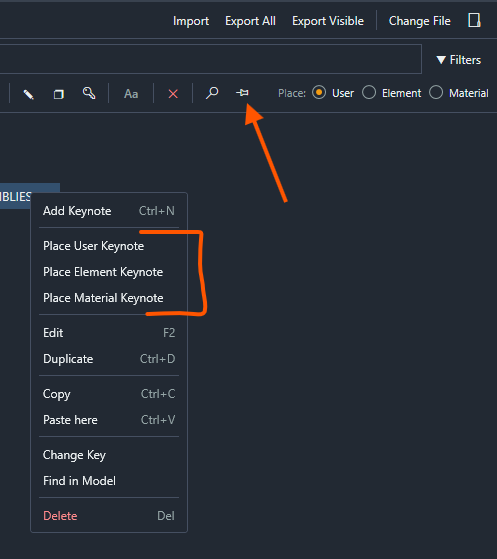
Is this dialogue intended to enable keynote element creation? it is greyed out and seemingly not usable.

First post, excited to be here and thanks for any help.
Is this dialogue intended to enable keynote element creation? it is greyed out and seemingly not usable.
First post, excited to be here and thanks for any help.
Hey @studio_ch, welcome to the forum.
It appears that your window might need its width expanded to find the Place in Model button (looks like a thumb tack). In the latest version of pyRevit, there is also a shift-click and right-click menu for placing keynotes from the Keynote Manager.
If widening the palette doesn’t enable it, check that the active view accepts keynote tags (not a schedule or legend) and that a keynote file is set in Keynote Settings; the Place in Model command can stay disabled when there’s nowhere valid to place a keynote. The thumbtack DYoung mentioned is easy to miss when the palette is docked narrow.