Hello,
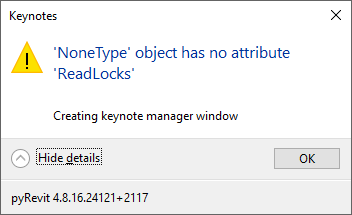
Starting the Manage Keynotes app I select the option Select a different keynote file and select one of default Revit keynote files. Then I get this error message:
Any suggestion would be appreciated.
Thank you.
Hello,
Starting the Manage Keynotes app I select the option Select a different keynote file and select one of default Revit keynote files. Then I get this error message:
Any suggestion would be appreciated.
Thank you.
hi @EvgenyK
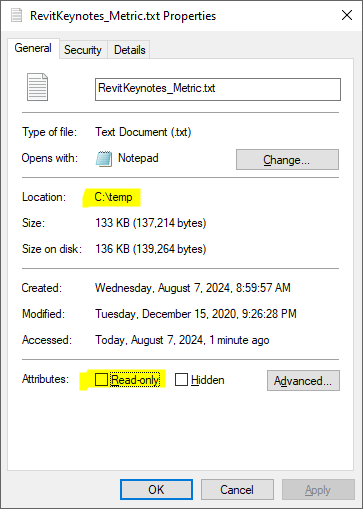
AFAIK the default revit keynotes files are read only
This may lead to error while using the keynote manager
I tried it myself, loading one of the default keynote file I got errors,
Copying it somewhere else and and removing the read only flag, it worked as expected.
Could be a problem with the file content? Do you have a file which is proven to be working for the Keynotes app?
this one for example, I already remove the read only tag
Thank you for sharing the file. Unfortunately the app gives the same error message. 
The keynote manager code has not change much in ages.
You could try create a new empty file then use the KM in it
Or
Uninstall and install latest pyrevit again.
Hi Jean-Mark.
Thank you for your suggestion. I have a brand-new computer for a month or so, and the pyRevit installation is fresh.
You are right, the problem is not in the Keynotes app, but in the pyRevit core. I will try to find a solution somewhere else.
Best Regards,
Evgeny.
A solution was found. Just use the Convert option on opening the keynotes file.
Anyways thank you for your help.