Hello,
We deploy pyRevit CLI to about 90 client machines. We have one client machine which has an issue with the pyRevit plugin in Revit, it won’t load with the following error message:
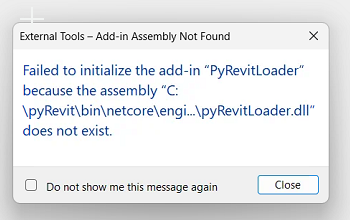
We ran the full uninstall of pyRevit, rebooted, installed the pyRevit CLI but to no avail, the issue persists. The file in the error is also not present on the sytem. Below is the output of the pyrevit.exe env and pyrevit.exe revits --installed commands, could you please let us know what is the cause of this issue and how to fix it:
C:\Program Files\pyRevit CLI>pyrevit.exe clones
==> Registered Clones (full git repos)
==> Registered Clones (deployed from archive/image)
master | Branch: "master" | Version: "7.0.0.26278+2233
" | Path: "C:\pyRevit"

C:\Program Files\pyRevit CLI>pyrevit.exe revits --installed
==> Installed Revits
Autodesk Revit 2027 | Version: 27.2.0.39 | Build: 20260716_1515(x64) | Language: 1033 | Path: "C:\Program Files\Autodesk\Revit 2027\"
2026 First Customer Ship | Version: 26.0.4.409 | Build: 20250227_1515(x64) | Language: 1033 | Path: "C:\Program Files\Autodesk\Revit 2026\"
2025 First Customer Ship | Version: 25.0.2.419 | Build: 20240307_1300(x64) | Language: 1033 | Path: "C:\Program Files\Autodesk\Revit 2025\"
Autodesk Revit 2024 | Version: 24.3.50.51 | Build: 20260518_1515(x64) | Language: 1033 | Path: "C:\Program Files\Autodesk\Revit 2024\"
2023.1.8 | Version: 23.1.80.30 | Build: 20250724_1515(x64) | Language: 1033 | Path: "C:\Program Files\Autodesk\Revit 2023\"
2022.1.5 | Version: 22.1.50.17 | Build: 20230915_1530(x64) | Language: 1033 | Path: "C:\Program Files\Autodesk\Revit 2022\"

C:\Program Files\pyRevit CLI>pyrevit.exe env
==> Registered Clones (full git repos)
==> Registered Clones (deployed from archive/image)
master | Branch: "master" | Version: "7.0.0.26278+2233
" | Path: "C:\pyRevit"
==> Attachments
master | Product: "Autodesk Revit 2027" | Engine: DEFAULT (2712) | Path: "C:\pyRevit" | AllUsers
master | Product: "2026 First Customer Ship" | Engine: DEFAULT (2712) | Path: "C:\pyRevit" | AllUsers
master | Product: "2025 First Customer Ship" | Engine: DEFAULT (2712) | Path: "C:\pyRevit" | AllUsers
master | Product: "Autodesk Revit 2024" | Engine: DEFAULT (2712) | Path: "C:\pyRevit" | AllUsers
master | Product: "2023.1.8" | Engine: DEFAULT (2712) | Path: "C:\pyRevit" | AllUsers
master | Product: "2022.1.5" | Engine: DEFAULT (2712) | Path: "C:\pyRevit" | AllUsers
==> Installed Extensions
pyApex | Type: UIExtension | Repo: "https://github.com/apex-project/pyApex.git" | Installed: "C:\pyRevit\master\Extensions\pyApex.extension"
pyChilizer | Type: UIExtension | Repo: "https://github.com/dnenov/pyChilizer" | Installed: "C:\pyRevit\master\Extensions\pyChilizer.extension"
==> Default Extension Search Path
C:\Users\nbrooks\AppData\Roaming\pyRevit\Extensions
==> Extension Search Paths
C:\pyRevit\master\Extensions
==> Extension Sources - Default
https://github.com/pyrevitlabs/pyRevit/raw/master/extensions/extensions.json
==> Extension Sources - Additional
==> Installed Revits
Autodesk Revit 2027 | Version: 27.2.0.39 | Build: 20260716_1515(x64) | Language: 1033 | Path: "C:\Program Files\Autodesk\Revit 2027\"
2026 First Customer Ship | Version: 26.0.4.409 | Build: 20250227_1515(x64) | Language: 1033 | Path: "C:\Program Files\Autodesk\Revit 2026\"
2025 First Customer Ship | Version: 25.0.2.419 | Build: 20240307_1300(x64) | Language: 1033 | Path: "C:\Program Files\Autodesk\Revit 2025\"
Autodesk Revit 2024 | Version: 24.3.50.51 | Build: 20260518_1515(x64) | Language: 1033 | Path: "C:\Program Files\Autodesk\Revit 2024\"
2023.1.8 | Version: 23.1.80.30 | Build: 20250724_1515(x64) | Language: 1033 | Path: "C:\Program Files\Autodesk\Revit 2023\"
2022.1.5 | Version: 22.1.50.17 | Build: 20230915_1530(x64) | Language: 1033 | Path: "C:\Program Files\Autodesk\Revit 2022\"
==> Running Revit Instances
==> User Environment
Microsoft Windows 10 [Version 10.0.26200]
Executing User: PHILADELPHIA\nbrooks
Active User: PHILADELPHIA\nbrooks
Admin Access: No
%APPDATA%: "C:\Users\nbrooks\AppData\Roaming"
Latest Installed .Net Framework: 10.0.14
No .Net Target Packs are installed.
No .Net-Core Target Packs are installed.
pyRevit CLI v5.3.1.25308+1659.87ab3dfd505f7f8ddfb7375b52a1ea7645640f7a

C:\Program Files\pyRevit CLI>