Hi everyone,
I’m the main computational designer at my firm, and I develop pyRevit Python plugins to automate repetitive Revit tasks for our team of 14 designers.
We deploy the pyRevit extension from our local company SharePoint, so everyone can easily access and use it. I add new plugins now and then, but others don’t get any notification inside pyRevit that new tools are available.
I’m wondering if there’s a built-in or recommended way in pyRevit to notify users directly inside the pyRevit interface when new plugins or tools are added — like a popup or banner alert.
If not, what’s the best approach to implement an update notification system within a pyRevit extension?
Suggestions are welcome if there’s a workaround!
Any guidance, examples would be greatly appreciated!
Thanks in advance!
You can define them as ‘new/updated’ in the bundle metadata (.yaml file).
Bundle Metadata
2 Likes
Many thanks Martin…It made my day!
Hello @DhruKataria,
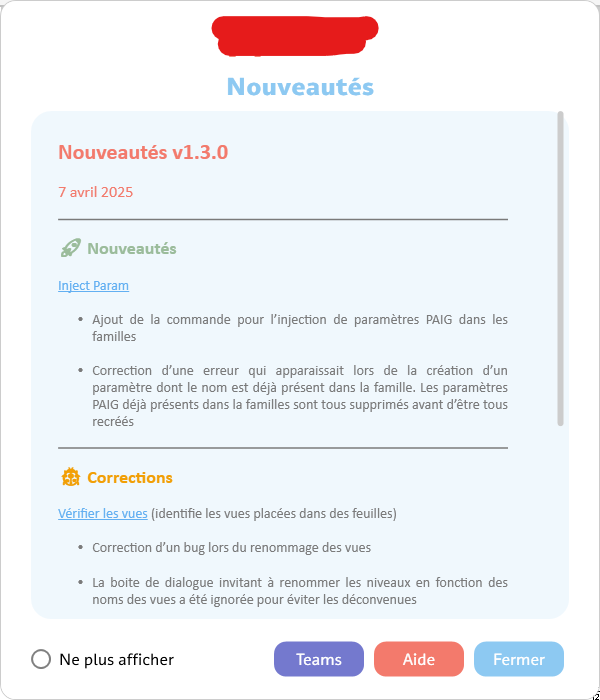
You can also use the [app-init] hook, which detects when Revit opens and runs whatever you want. I use it in my company to display a “News Window” when adding or updating commands, with a “do not show again” button that saves a variable in the pyRevit_config file. Very useful!
Create Your First Hook
7 Likes
Hi @Mohamed.Asli, Thank you so much for your answer, can you show me a working example of it or maybe show some code, also the UI looks like it is made using xaml ! How to do that too!
Sorry for the late answer!
Yes, I have a structure that looks like this:
MyExtension
│
├── MyExtension.extension
│ └── hooks
│   ├── app-init.py         # hook script with your logic
│   ├── news.xaml
│   └── news.md             # Markdown content to display
│
└── lib/
  └── md_parser.py        # a markdown parser (personal preference to use .md)
You can only put your app-init.py file in the hooks directory, and move all the backend logic to the lib directory, which is cleaner.
# app-init.py

class WindowClass(WPFWindow):
    def __init__(self):
        script_dir = os.path.dirname(os.path.abspath(__file__))
        xaml_file = os.path.join(script_dir, "news.xaml")
        WPFWindow.__init__(self, xaml_file)

        self.show_dialog()
        # all the logic you want to implement (button bindings, events...)

if whatever_condition_to_check == True:
    NewsWindow()
For the XAML, you can do whatever you want, with a RichTextBox to display markdown content.