First of all, thank you for this incredible plugin and the continuous efforts from the development team. It’s a fantastic tool that greatly enhances our workflow in Revit.
I would like to kindly ask if there are any plans to add a Chinese (Simplified) language interface for the pyRevit extension? As a user who is more comfortable with Chinese, having a localized interface would make the tool even more accessible and easier to use for me and potentially many other Chinese-speaking users.
If it’s not currently on the roadmap, could you please share if this is a feature that might be considered for future releases? Any information regarding localization efforts would be greatly appreciated.
Thank you for your time and for building such a wonderful community.
Hello again,
I’d like to offer my assistance to help move this forward. As a native Chinese speaker, I am willing to contribute by translating the user interface.
To get started, could the development team please provide a spreadsheet containing the English text that needs to be translated?
I’m not entirely familiar with the technical process of integrating translations into the plugin—whether it involves simple text replacement or a more complex localization framework. However, even if my contribution is limited to preparing the translated content, I believe it could be a significant help for future implementation.
Please let me know if this approach is feasible.
Thank you again for your consideration.
Hi,
Do you have a name you go by for non Chinese speaking people around here.
The process is actually pretty straight forward. At a high level:
Fork the repo
Create a branch from develop branch
Edit all the bundle.yaml files you can find on the repo and add under title: and tooltip: the chines_s locale like so:
title:
  ru: Очистить кэш BIM360 Collab
  fr_fr: Supprimer le cache BIM360
  en_us: Wipe BIM360 Collab Cache
  de_de: Lösche BIM360 Collab Speicher
  chinese_s: your translation here
tooltip:
  ru: Очищает выбранный кэш совместной работы BIM360.
  fr_fr: Efface le Collaboration Cache de BIM360
  en_us: Erase selected BIM360 collaboration cache
  de_de: Hiermit wird der BIM360 Collaboration Speicher gelöscht
context: zero-doc
  chinese_s: your translation here
From:
Don’t edit anything else in each file, proofread, …
Make commits after these changes, make it by batches of 10 files so that it is easier to review
Make a PR from your branch against the develop branch on the pyrevit repo (you can actually make a draft pr and keep on working and commiting against your branch and once down, make it an actual of ready for review)
There are a few specific UI that can be translated differently, but I can walk you through once you are done with bundle.yaml which is already a lot.
There are also some UI s that are not designed for translation, but let’s keep that for another day
First of all, I’m sorry, I tried to find where to change the “Username” you mentioned but couldn’t find it.
Thank you so much for the detailed instructions and for being so supportive.
To be honest, the process you described is a bit beyond my current skills. I have no experience with programming, GitHub, or working with YAML files. I’m afraid I might accidentally break something if I try to modify the code repository directly.
My strength and what I can confidently contribute is the translation itself.
Would it be possible to provide me with a simpler way to get the text that needs translation? For example, could you or the team generate a simple list or a spreadsheet that contains all the title and tooltip English texts from the bundle.yaml files?
I can then take that list, fill in all the accurate Chinese translations, and send the completed spreadsheet back to you. This way, someone from the team (who is familiar with the code) can easily integrate the translations without any risk of me making technical errors.
I am still very enthusiastic about helping to bring the Chinese interface to pyRevit. I hope we can find a way that leverages my language skills.
It should be possible to have a script walk through all the folders, analyze the bundle.yaml and summarize their title-en_us and tooltip-en_us in a single file for editing.
A second script could do the re-import then. I’ll try if i can set sth up.
@Jean-Marc@pyrevti
I have good news—the translation of the CSV file is now complete. Thank you again for preparing the file; the clear format made the translation process straightforward.
Since I’m not familiar with GitHub’s submission process, to make it easy, I have uploaded the translated file to Google Drive. You can download it via this link:
If you prefer another method (such as email attachment or a different file-sharing service), please let me know and I’ll gladly resend it.
About the translation:
All title and tooltip entries have been translated into Simplified Chinese.
I paid special attention to the consistency of Revit-specific terms. and kept the language natural for Chinese users.
The file structure remains unchanged; only the third column has been filled.
I am very willing to continue assisting with further translation work. If there are additional UI texts to translate (such as messages, settings panels, etc.), please feel free to organize them in a similar format and send them my way—I’ll be happy to help.
Please review the file. If any adjustments are needed, I’m ready to revise accordingly.
This is great. I already merged the pr.
But before being able to use it through the installer, we have had an outstanding issue with the CI that builds the installers. Will try to fix it over the weekend if no one else picks it up.
Quick question: where should I download the latest WIP (development) version to test the translations? Is it through the regular installer with a specific setting, or from a particular GitHub page?
I’ve installed the latest version and successfully switched the language to Chinese. It’s very exciting to see the translated buttons and tooltips in place!
As you mentioned earlier, there are more windows that can be translated. I noticed that the pop-up windows and dialog boxes are currently still in English. Completing the translation of these would provide users with a fully Chinese experience.
I’m ready to help whenever you have the new text extracted and organized. Just let me know when the files are ready for translation.
Just tried the latest WIP version. The settings page is very well translated, and there are no issues with the UI.
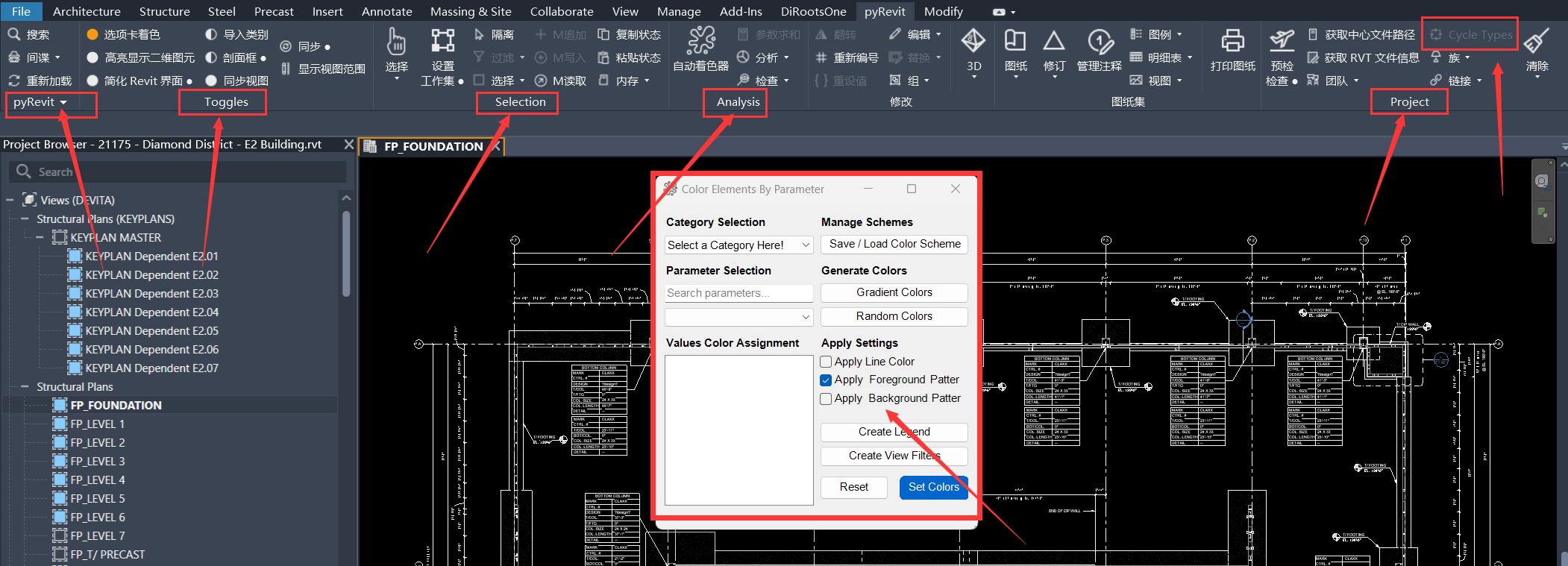
However, I noticed that the spots pointed out by the arrows in the screenshot are still in English. I’m not sure if these texts are stored in a separate file or require special handling?
Also, the pop-up windows for specific function buttons are still in English, just like the situation mentioned earlier.
If these missing texts (including the pop-ups) need to be translated, I’m ready to help you with the translation at any time. Thanks for your efforts!
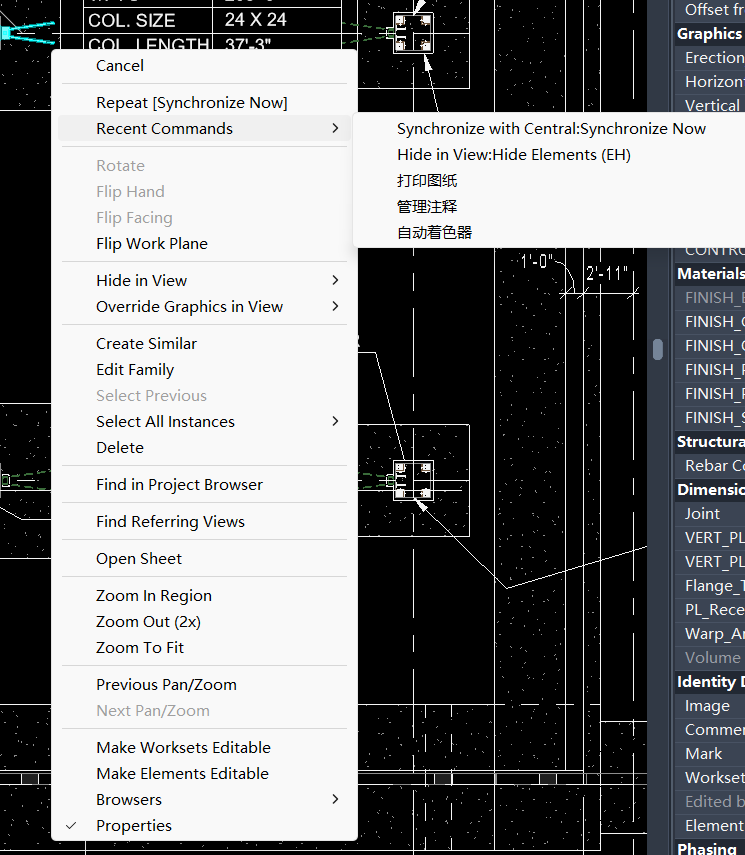
I noticed another detail: in the right-click context menu, some items are in Chinese while others remain in English. Could this be because the localization isn’t fully applied there yet, or are those strings stored separately?
Just thought I’d mention it since we’re going through the interface. If those also need to be pulled together for translation, I’m happy to help with those too.