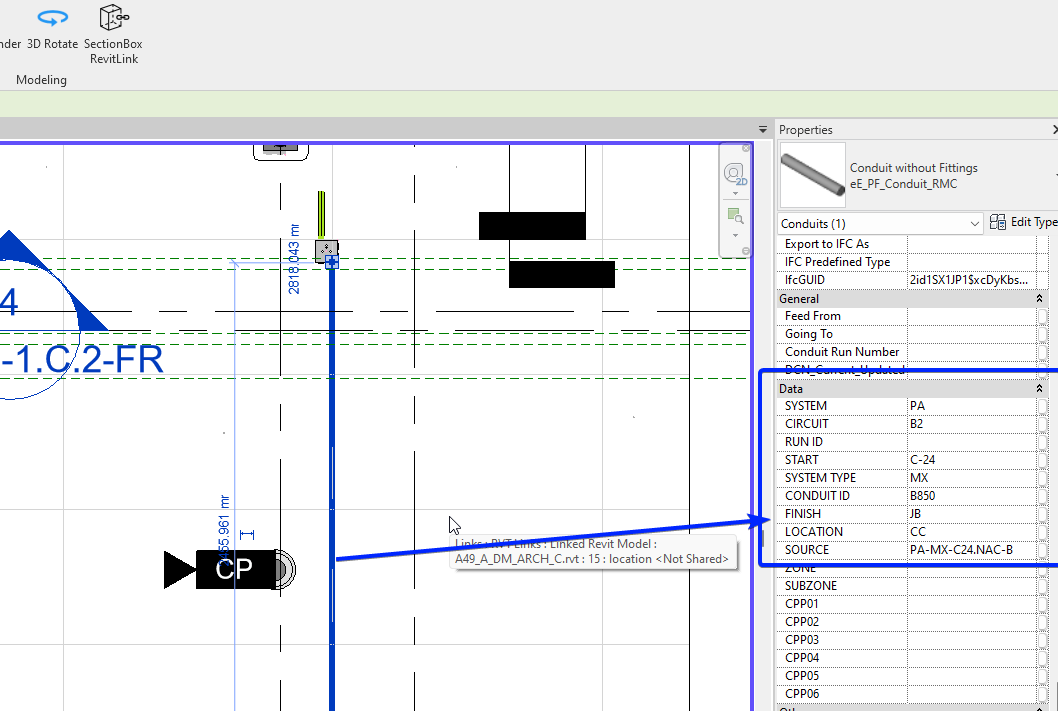
We have a bunch of conduits / conduit fittings in the electrical model, all these elements need to be tagged whit some info in their parameters, like Panel Supplied From, Circuits and some others.
The goal is setting up a conduit whit all the correct information, select as a source object and all the next elements created will be created whit al the parameters as the source object.
Hooks are basically Events in the Revit API, you can piggy back on whatever event in Revit to do something after
Events often triggered with intensive Revit manipulation with code can cause a processing overhead → Heavy on Revit → Use with care and optimize the code the hook will run beforehand, before integrating it in a hook so that you don’t crash Revit over and over while debugging
DocumentChanged Application Events is the one you may want to use unless you want to run your code only before Syncing for example which would bring less processing overhead → you have different levels of Hooks: Application, Document, UI Application, ControlledApplication…
Please do share your progress, this should help plenty of people here.