How, is it possible, can you show the button without it displaying the name but just show the icon?
I have not tested this, but I would assume an empty title or a space in the title can work.
title: ““
or
title: “ “
Edit: it did not work, pyrevit error for title cannot be None…
yeah, i got the same error trying to leave it blank 
Revit doesn’t seem to allow empty strings for the title. Also tried some non-width chars and it did not work.
Found a hack!
In bundle.yaml use:
title: “\u3164”
Its using a Hangul Filler that appears blank.Tested in both 6.X and 5.X
Edit: The title will be missing also when hovering over the icon with cursor, so it can look a little weird.
Optional hack:
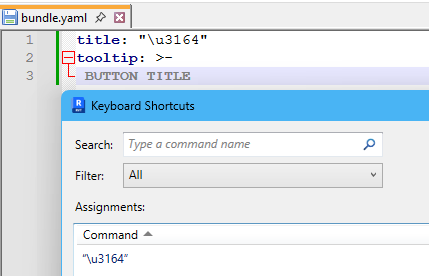
title: "\u3164"
tooltip: >-
BUTTON TITLE
Tooltip for this button
2 Likes
so now the real question is…is it still able to be found and used as a shortcut???
With that code yes