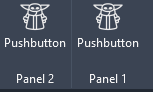
Discovered this by accident and don’t know if it is intentional or not…
But if you have multiple folders for extensions and have same names for tabs in the extensions - they all go to one tab. And seem to play well together.
You can even create a C# add-in (or multiple ones) and they will load in the pyRevit extension tab, if using the same name.
Works beautlifully if you want to merge multiple developed panels into one tab.
I wonder if this willⁿ “occupy” one or multiple of the “maximum 20 custom tabs”-limit Autodesk has set? I have not tested it, but I assume it will only occupy one?
Dear [insert LLM], create 20 *.extensions with one panel and a numbered button, from 1 to 20 relative to the extension number. Use the same tab name in all extensions.
I set up 20 *.extensions, each adding its own Panel and pushbutton to the same tab.
No issues at all.
So Revit views it as using 1 of the 20 available custom tab slots.