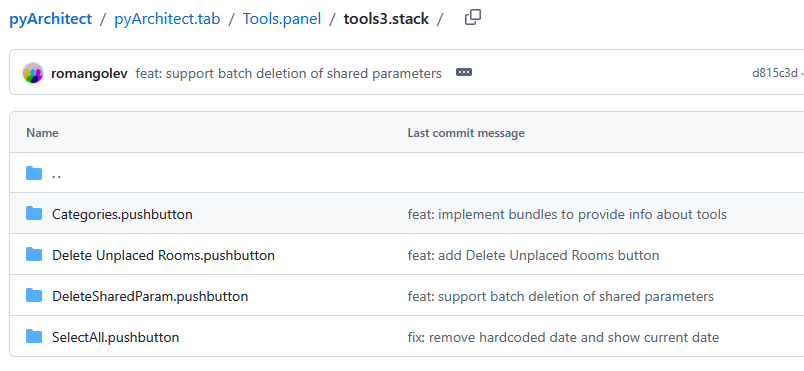
I recently saw a notification about an update available for the pyRevit pyArchitect extension. After installing the update, I’m now getting the following Error message every time Revit is launched:
ERROR [pyrevit.loader.uimaker] Error creating stack | Can not create stack of 4. Stack can only have 2 or 3 items.

Traceback:
 File "C:\Users\patrick\AppData\Roaming\pyRevit-Master\pyrevitlib\pyrevit\loader\uimaker.py", line 506, in _produce_ui_stacks
 parent_ui_panel.close_stack()
I really don’t see any difference to any of the pyRevit or other py tool bars, so I’m not sure where the problem is. Unfortunately I don’t really know anything about Python or any sort of programming language, so I don’t even know where to start or look to remedy this issue. Any suggestions?
Look for a folder name that ends with .stack and see if any of those folders has more than 3 subfolders, in which case, 1 or more folder need to be removed
yeah I don’t know. I looked in Tools3.stack and found the 4 folders like shown above. But I also have a Tools4.stack with that same SelectAll.pushbutton with the same files in it. So I deleted that folder out of Tools3. Closed and restarted Revit, but there is no SelectAll button anywhere in the Tools panel under pyArchitect. So no more error, but also no tool, which seems weird.
@PatrickGSR94@pyrevti
Got it settled right now, my bad. Thanks for pointing that out! Tag me next time or create an issue/PR directly on gh for faster response