Edit Text Notes but keep formatting (Bullets, Numberic, Alphanumberic)

As the title says, is this possible with pyRevit?
We have Ideate Software and when I tried to use this to do a find/replace, it got rid of my numbered list like this:
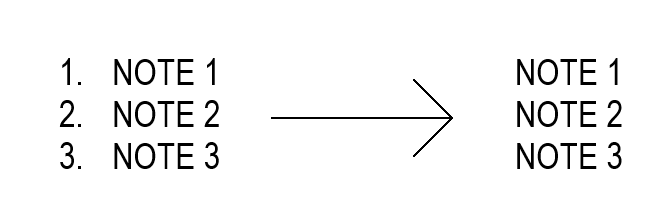
Revit does have a find/replace but it applies it either per active view or project wide, not by selected sheets (which is how I need to go about due to project phase setup).

Has anyone attempted this with pyRevit? I have had not luck. It was yielding the same results as with Ideate Software. I was able to come up with this so far. If anyone has any suggestions or solutions, I would appreciate that information. Thanks.

# -*- coding: utf-8 -*-
# pyRevit | IronPython 2.7 | Revit 2023–2025


__title__ = "Edit Text"
__doc__   = "Select Text Notes (all, pre-selected, pick, or entire project) and apply Find/Replace, Prefix, or Suffix edits with live preview and filtering."

import clr, os
clr.AddReference("RevitAPI")
clr.AddReference("PresentationFramework")
clr.AddReference("PresentationCore")
clr.AddReference("System.Xaml")

from Autodesk.Revit.DB import *
from Autodesk.Revit.UI.Selection import ObjectType, ISelectionFilter
from pyrevit import revit, forms, script
from System.Windows.Markup import XamlReader
from System.IO import FileStream, FileMode
from System.Windows import Window
from System.Windows.Media import Brushes
from System.Windows import FontWeights
from System.Windows.Controls import Label
from System.Windows import TextWrapping, Thickness


# ---------------- Context ---------------- #
doc   = revit.doc
uidoc = revit.uidoc

if not doc or not uidoc:
    forms.alert("No active Revit document.", title="Error")
    script.exit()


# ---------------- Selection Filter ---------------- #
class TextNoteSelectionFilter(ISelectionFilter):
    def AllowElement(self, elem):
        return isinstance(elem, TextNote)
    def AllowReference(self, ref, point):
        return False


# ---------------- UI Window ---------------- #
class LiveTextEditWindow(Window):
    def __init__(self, original_texts):
        # --- Load XAML layout ---
        xaml_path = os.path.join(os.path.dirname(__file__), "EditText_ui.xaml")
        fs = FileStream(xaml_path, FileMode.Open)
        content = XamlReader.Load(fs)
        fs.Close()

        # Window setup
        self.Title = "Live Preview Text Edit"
        self.Width = 1500
        self.Height = 550
        
        from System.Windows import WindowStartupLocation
        self.WindowStartupLocation = WindowStartupLocation.CenterScreen

        
        self.Content = content
        self.was_confirmed = False

        # Data
        self.original_texts = original_texts
        self.filtered_texts = list(original_texts)

        # --- Bind XAML Controls ---
        self.tb_filter   = content.FindName("tb_filter")
        self.tb_mode     = content.FindName("tb_mode")
        self.tb_find     = content.FindName("tb_find")
        self.tb_replace  = content.FindName("tb_replace")
        self.old_list    = content.FindName("old_list")
        self.new_list    = content.FindName("new_list")
        self.ok          = content.FindName("ok")
        self.cancel      = content.FindName("cancel")
        self.status_label = content.FindName("status_label")

        # --- Events ---
        self.tb_filter.TextChanged += self.filter_texts
        self.tb_find.TextChanged += self.update_preview
        self.tb_replace.TextChanged += self.update_preview
        self.tb_mode.SelectionChanged += self.update_preview
        self.ok.Click += self.on_ok
        self.cancel.Click += self.on_cancel
        self.old_list.SelectionChanged += self.sync_selection_old
        self.new_list.SelectionChanged += self.sync_selection_new

        # Default selection
        if self.tb_mode.SelectedIndex < 0:
            self.tb_mode.SelectedIndex = 0

        # Auto-focus and initialize after load
        def on_loaded(sender, args):
            self.tb_filter.Focus()
            self.filter_texts(None, None)
            self.new_list.SizeChanged += self.update_preview
            self.old_list.SizeChanged += self.update_preview

        self.Loaded += on_loaded


    # ---------------- Filtering Logic ---------------- #
    def filter_texts(self, sender, args):
        term = (self.tb_filter.Text or "").lower().strip()
        if not term:
            self.filtered_texts = list(self.original_texts)
        else:
            self.filtered_texts = [t for t in self.original_texts if term in t.lower()]
        self.update_preview(None, None)


    # ---------------- Preview Logic ---------------- #
    # ---------------- Preview Logic ---------------- #
    def update_preview(self, sender, args):
        try:
            if not self.filtered_texts:
                self.status_label.Content = "⚠️ No text notes found or filtered out."
                self.old_list.Items.Clear()
                self.new_list.Items.Clear()
                return

            find = self.tb_find.Text or ""
            replace = self.tb_replace.Text or ""
            filter_term = (self.tb_filter.Text or "").strip()
            mode_item = self.tb_mode.SelectedItem
            mode = mode_item.Content.ToString() if mode_item else "Find/Replace"

            from System.Windows.Controls import TextBlock
            from System.Windows.Documents import Run

            self.old_list.Items.Clear()
            self.new_list.Items.Clear()
            changed_count = 0

            for name in self.filtered_texts:

                tb_old = TextBlock()
                tb_old.Text = name
                tb_old.TextWrapping = TextWrapping.Wrap
                tb_old.TextTrimming = 0
                tb_old.Margin = Thickness(2, 0, 2, 4)
                #tb_old.Width = self.old_list.ActualWidth - 25 if self.old_list.ActualWidth > 25 else 400
                padding_margin = 35  # accounts for scrollbar + internal margins
                tb_old.Width = max(100, self.old_list.ActualWidth - padding_margin)
                #tb.Width = max(100, self.new_list.ActualWidth - padding_margin)

                self.old_list.Items.Add(tb_old)

                new = name
                if mode == "Find/Replace" and find:
                    new = name.replace(find, replace)
                elif mode == "Prefix":
                    new = replace + name
                elif mode == "Suffix":
                    new = name + replace

                # --- Build Highlighted TextBlock ---
                # --- Build Highlighted TextBlock (with wrapping) ---
                
                tb = TextBlock()
                tb.TextWrapping = TextWrapping.Wrap
                tb.TextTrimming = 0  # Disable ellipsis truncation
                tb.Margin = Thickness(2, 0, 2, 4)
                #tb.Width = self.new_list.ActualWidth - 25 if self.new_list.ActualWidth > 25 else 400
                padding_margin = 35  # accounts for scrollbar + internal margins
                #tb_old.Width = max(100, self.old_list.ActualWidth - padding_margin)
                tb.Width = max(100, self.new_list.ActualWidth - padding_margin)


                if filter_term and filter_term.lower() in new.lower():
                    lower_new = new.lower()
                    lower_term = filter_term.lower()
                    start = 0
                    while True:
                        idx = lower_new.find(lower_term, start)
                        if idx == -1:
                            tb.Inlines.Add(Run(new[start:]))
                            break
                        # Add normal part before match
                        if idx > start:
                            tb.Inlines.Add(Run(new[start:idx]))
                        # Add matched part highlighted
                        match = Run(new[idx:idx + len(filter_term)])
                        match.Foreground = Brushes.Blue
                        match.FontWeight = FontWeights.Bold
                        tb.Inlines.Add(match)
                        start = idx + len(filter_term)
                else:
                    tb.Inlines.Add(Run(new))

                # --- Apply change color for modified lines ---
                if new != name:
                    changed_count += 1
                    tb.Foreground = Brushes.Blue
                    tb.FontWeight = FontWeights.Bold

                self.new_list.Items.Add(tb)

            self.status_label.Content = "{} / {} visible | {} will change".format(
                len(self.filtered_texts), len(self.original_texts), changed_count
            )

        except Exception as e:
            print("Preview error:", e)


    # ---------------- Selection Sync ---------------- #
    def sync_selection_old(self, sender, args):
        idx = self.old_list.SelectedIndex
        if idx >= 0 and idx < self.new_list.Items.Count:
            self.new_list.SelectedIndex = idx

    def sync_selection_new(self, sender, args):
        idx = self.new_list.SelectedIndex
        if idx >= 0 and idx < self.old_list.Items.Count:
            self.old_list.SelectedIndex = idx

    # ---------------- Buttons ---------------- #
    def on_ok(self, sender, args):
        self.was_confirmed = True
        self.Close()

    def on_cancel(self, sender, args):
        self.was_confirmed = False
        self.Close()


# ---------------- Helpers ---------------- #
def get_textnotes_all():
    """Get all TextNotes belonging to the active view (handles Sheets, Drafting, Legends, etc.)."""
    active_view_id = doc.ActiveView.Id
    try:
        # Primary collector scoped to active view
        collector = FilteredElementCollector(doc, active_view_id).OfClass(TextNote)
        notes = list(collector)
        if notes:
            return notes

        # Fallback: global collector filtered by OwnerViewId
        all_notes = FilteredElementCollector(doc).OfClass(TextNote).WhereElementIsNotElementType()
        return [n for n in all_notes if n.OwnerViewId == active_view_id]
    except Exception as e:
        print("Collector error:", e)
        return []


def get_textnotes_selected():
    """Let user manually pick TextNotes only."""
    try:
        refs = uidoc.Selection.PickObjects(ObjectType.Element, TextNoteSelectionFilter(), "Select Text Notes")
        return [doc.GetElement(r.ElementId) for r in refs if isinstance(doc.GetElement(r.ElementId), TextNote)]
    except:
        return []


def get_textnotes_preselected():
    """Use currently pre-selected TextNotes in Revit."""
    sel_ids = uidoc.Selection.GetElementIds()
    if not sel_ids:
        return []
    return [doc.GetElement(i) for i in sel_ids if isinstance(doc.GetElement(i), TextNote)]


def get_textnotes_all_project():
    """Collect all TextNotes in the entire project."""
    return list(FilteredElementCollector(doc).OfClass(TextNote).WhereElementIsNotElementType())


def get_textnotes_from_selected_sheets():
    """Collect all TextNotes from user-selected Sheets, including both sheet-based and view-based notes."""
    # --- Collect all sheets ---
    sheets = list(FilteredElementCollector(doc)
                  .OfCategory(BuiltInCategory.OST_Sheets)
                  .WhereElementIsNotElementType())
    if not sheets:
        forms.alert("No sheets found in project.", title="Error")
        return []

    # --- Build display list ---
    sheet_dict = {}
    display_list = []
    for s in sheets:
        try:
            label = "{} - {}".format(s.SheetNumber, s.Name)
            sheet_dict[label] = s
            display_list.append(label)
        except:
            pass

    selected_labels = forms.SelectFromList.show(
        sorted(display_list),
        multiselect=True,
        title="Select Sheets to Collect Text Notes"
    )
    if not selected_labels:
        return []

    selected_sheets = [sheet_dict[l] for l in selected_labels]
    selected_sheet_ids = [s.Id for s in selected_sheets]

    # ----------------------------------------------------------------------
    # PART 1 — Collect all view IDs placed on selected sheets
    # ----------------------------------------------------------------------
    view_ids = []
    for s in selected_sheets:
        vports = FilteredElementCollector(doc, s.Id).OfClass(Viewport).ToElements()
        for vp in vports:
            view_ids.append(vp.ViewId)

    # ----------------------------------------------------------------------
    # PART 2 — Collect all TextNotes directly placed on selected sheets
    # ----------------------------------------------------------------------
    sheet_textnotes = []
    for sid in selected_sheet_ids:
        try:
            notes_on_sheet = FilteredElementCollector(doc, sid).OfClass(TextNote).ToElements()
            sheet_textnotes.extend(notes_on_sheet)
        except:
            pass

    # ----------------------------------------------------------------------
    # PART 3 — Collect all TextNotes from the views placed on those sheets
    # (uses your original reliable method)
    # ----------------------------------------------------------------------
    view_textnotes = []
    for vid in view_ids:
        try:
            notes_in_view = FilteredElementCollector(doc, vid).OfClass(TextNote).ToElements()
            view_textnotes.extend(notes_in_view)
        except:
            pass

    # ----------------------------------------------------------------------
    # Combine results (deduplicate by ElementId)
    # ----------------------------------------------------------------------
    unique_ids = set()
    combined = []
    for n in sheet_textnotes + view_textnotes:
        if n.Id not in unique_ids:
            unique_ids.add(n.Id)
            combined.append(n)

    return combined


# ---------------- MAIN ---------------- #
choice = forms.SelectFromList.show(
    [
        "Select All (Active View)",
        "Pre-selected",
        "User Selection",
        "Select All (Selected Sheets)",
        "Select All in Project"
    ],
    title="Select which Text Notes to edit:",
    multiselect=False
)


if choice == "Cancel" or not choice:
    script.exit()
elif choice == "Select All (Active View)":
    notes = get_textnotes_all()
elif choice == "Pre-selected":
    notes = get_textnotes_preselected()
elif choice == "User Selection":
    notes = get_textnotes_selected()
elif choice == "Select All (Selected Sheets)":
    notes = get_textnotes_from_selected_sheets()    
elif choice == "Select All in Project":
    notes = get_textnotes_all_project()
else:
    script.exit()

if not notes:
    forms.alert("No text notes found for that selection.", title="Error")
    script.exit()


# --- Filter out text notes that are part of a group ---
grouped_notes = []
clean_notes = []

for n in notes:
    try:
        if hasattr(n, "GroupId") and n.GroupId != ElementId.InvalidElementId:
            grp = doc.GetElement(n.GroupId)
            if isinstance(grp, Group):
                grouped_notes.append(n)
                continue
        if hasattr(n, "SuperComponent") and n.SuperComponent and isinstance(n.SuperComponent, Group):
            grouped_notes.append(n)
            continue
        clean_notes.append(n)
    except:
        clean_notes.append(n)

if grouped_notes:
    forms.alert(
        "⚠️ {} Text Notes belong to groups and will be skipped from editing.".format(len(grouped_notes)),
        title="Grouped Text Notes Skipped"
    )

notes = clean_notes


original = [n.Text for n in notes]
dialog = LiveTextEditWindow(original)
dialog.ShowDialog()

if not dialog.was_confirmed:
    script.exit()

mode_item = dialog.tb_mode.SelectedItem
mode = mode_item.Content.ToString() if mode_item else "Find/Replace"
find = dialog.tb_find.Text or ""
replace = dialog.tb_replace.Text or ""
filtered_texts = dialog.filtered_texts

with revit.Transaction("Edit Text Notes"):
    for n in notes:
        if n.Text not in filtered_texts:
            continue
        txt = n.Text
        if mode == "Find/Replace" and find:
            txt = txt.replace(find, replace)
        elif mode == "Prefix":
            txt = replace + txt
        elif mode == "Suffix":
            txt = txt + replace
        n.Text = txt

<Grid xmlns="http://schemas.microsoft.com/winfx/2006/xaml/presentation"
      xmlns:x="http://schemas.microsoft.com/winfx/2006/xaml"
      Background="White"
	  
      Margin="10">

    <Grid.RowDefinitions>
        <RowDefinition Height="*" />
        <RowDefinition Height="30" />
    </Grid.RowDefinitions>

    <Grid.ColumnDefinitions>
        <ColumnDefinition Width="200" />
        <ColumnDefinition Width="*" />
    </Grid.ColumnDefinitions>

    <!-- LEFT PANEL -->
    <StackPanel Grid.Column="0" Margin="5">
        <!-- Filter -->
        <Label Content="Filter (contains):" Foreground="Blue" />
        <TextBox x:Name="tb_filter" Width="180" Margin="0,0,0,8" />

        <!-- Mode -->
        <Label Content="Mode" Foreground="Blue" />
        <ListBox x:Name="tb_mode" Height="70" Margin="0,0,0,8">
            <ListBoxItem Content="Find/Replace" />
            <ListBoxItem Content="Prefix" />
            <ListBoxItem Content="Suffix" />
        </ListBox>

        <!-- Find -->
        <Label Content="Find" Foreground="Blue" />
        <TextBox x:Name="tb_find" Width="180" Margin="0,0,0,8" />

        <!-- Replace / Prefix / Suffix -->
        <Label Content="Replace / Prefix / Suffix" Foreground="Blue" />
        <TextBox x:Name="tb_replace" Width="180" Margin="0,0,0,8" />

        <Label Height="20" />

        <!-- Buttons -->
        <StackPanel Orientation="Horizontal" HorizontalAlignment="Left">
            <Button x:Name="ok" Content="Apply" Width="80" Margin="2" Foreground="Blue" />
            <Button x:Name="cancel" Content="Cancel" Width="80" Margin="2" Foreground="Blue" />
        </StackPanel>
    </StackPanel>

    <!-- RIGHT PANEL -->
    <Grid Grid.Column="1">
        <Grid.RowDefinitions>
            <RowDefinition Height="30" />
            <RowDefinition Height="*" />
        </Grid.RowDefinitions>

        <!-- Column Headers -->
        <Grid>
            <Grid.ColumnDefinitions>
                <ColumnDefinition Width="*" />
                <ColumnDefinition Width="*" />
            </Grid.ColumnDefinitions>

            <Label Content="Original" Foreground="Blue" Grid.Column="0" />
            <Label Content="Preview" Foreground="Blue" Grid.Column="1" />
        </Grid>

        <!-- Lists -->
        <Grid Grid.Row="1">
            <Grid.ColumnDefinitions>
                <ColumnDefinition Width="*" />
                <ColumnDefinition Width="*" />
            </Grid.ColumnDefinitions>

			<ListBox x:Name="old_list"
					 Grid.Column="0"
					 MinWidth="200"
					 HorizontalContentAlignment="Stretch"
					 ScrollViewer.HorizontalScrollBarVisibility="Disabled"
					 ScrollViewer.VerticalScrollBarVisibility="Auto" />

			<ListBox x:Name="new_list"
					 Grid.Column="1"
					 MinWidth="200"
					 HorizontalContentAlignment="Stretch"
					 ScrollViewer.HorizontalScrollBarVisibility="Disabled"
					 ScrollViewer.VerticalScrollBarVisibility="Auto" />

        </Grid>
    </Grid>

    <!-- STATUS BAR -->
    <Label x:Name="status_label" Grid.Row="1" Grid.ColumnSpan="2"
           Foreground="Blue" Content="" />
</Grid>

This is a challenge. Revit stores formatted text in an opaque manner. You basically have to scan through the formatted text from TextNote.GetFormattedText(), split out each paragraph, then find contiguous blocks of FormattedText that you can classify with these methods:

FormattedText.GetBoldStatus(TextRange)
FormattedText.GetItalicStatus(TextRange)
FormattedText.GetUnderlineStatus(TextRange)
FormattedText.GetSuperscriptStatus(TextRange)
FormattedText.GetSubscriptStatus(TextRange)
FormattedText.GetAllCapsStatus(TextRange)

Bullets and numbered lists add some complexity. I got a lot of help from Claude and came up with this solution to turn a TextNote into something between HTML and Markdown so that you can edit it and rewrite your TextNote.

"""
Revit FormattedText <-> Markdown/HTML Translator
Converts between Revit's FormattedText format and human-editable text.
"""

from Autodesk.Revit.DB import FormattedText, TextRange, FormatStatus, ListType
import re


class FormattedTextTranslator:
    """Bidirectional translator between Revit FormattedText and editable text format."""
    
    def __init__(self):
        # Formatting markers for different styles
        self.BOLD_MARKER = '**'
        self.ITALIC_MARKER = '*'
        self.UNDERLINE_START = '<u>'
        self.UNDERLINE_END = '</u>'
        self.SUPER_START = '<sup>'
        self.SUPER_END = '</sup>'
        self.SUB_START = '<sub>'
        self.SUB_END = '</sub>'
        self.CAPS_START = '<caps>'
        self.CAPS_END = '</caps>'
    
    def formatted_text_to_markdown(self, formatted_text):
        """
        Convert a Revit FormattedText object to human-editable markdown/HTML.
        
        Args:
            formatted_text: FormattedText object from Revit
            
        Returns:
            str: Human-editable text with markdown/HTML formatting
        """
        plain_text = formatted_text.GetPlainText()
        if not plain_text:
            return ""
        
        # Build a list of formatting segments
        segments = self._analyze_formatting(formatted_text, plain_text)
        
        # Convert segments to markdown
        result = self._segments_to_markdown(segments, plain_text, formatted_text)
        
        return result
    
    def _analyze_formatting(self, formatted_text, plain_text):
        """
        Analyze the formatted text and build a list of formatting changes.
        
        Returns a list of tuples: (position, format_changes)
        where format_changes is a dict of format types and their new states.
        """
        length = len(plain_text)
        if length == 0:
            return []
        
        # Track formatting state at each character position
        formatting_map = []
        
        for i in range(length):
            # Skip formatting check for carriage returns and vertical tabs
            # These are structural characters, not content
            if plain_text[i] in ['\r', '\v']:
                formatting_map.append(self._default_format())
                continue
                
            text_range = TextRange(i, 1)
            
            char_format = {
                'bold': formatted_text.GetBoldStatus(text_range) == FormatStatus.All,
                'italic': formatted_text.GetItalicStatus(text_range) == FormatStatus.All,
                'underline': formatted_text.GetUnderlineStatus(text_range) == FormatStatus.All,
                'superscript': formatted_text.GetSuperscriptStatus(text_range) == FormatStatus.All,
                'subscript': formatted_text.GetSubscriptStatus(text_range) == FormatStatus.All,
                'allcaps': formatted_text.GetAllCapsStatus(text_range) == FormatStatus.All,
            }
            
            formatting_map.append(char_format)
        
        # Identify formatting change points
        segments = []
        current_format = formatting_map[0].copy()
        segment_start = 0
        
        for i in range(1, length):
            if formatting_map[i] != current_format:
                # Format changed, record the segment
                segments.append((segment_start, i, current_format.copy()))
                current_format = formatting_map[i].copy()
                segment_start = i
        
        # Add final segment
        segments.append((segment_start, length, current_format.copy()))
        
        return segments
    
    def _segments_to_markdown(self, segments, plain_text, formatted_text):
        """Convert formatting segments to markdown text."""
        result = []
        
        for start, end, formats in segments:
            text = plain_text[start:end]
            
            # Don't apply formatting to structural characters
            if text in ['\r', '\v']:
                result.append(text)
                continue
            
            # Apply formatting in specific order to ensure proper nesting
            # Order: allcaps -> underline -> super/sub -> bold -> italic
            
            if formats['allcaps']:
                text = self.CAPS_START + text + self.CAPS_END
            
            if formats['underline']:
                text = self.UNDERLINE_START + text + self.UNDERLINE_END
            
            if formats['superscript']:
                text = self.SUPER_START + text + self.SUPER_END
            elif formats['subscript']:  # Can't be both super and sub
                text = self.SUB_START + text + self.SUB_END
            
            if formats['bold']:
                text = self.BOLD_MARKER + text + self.BOLD_MARKER
            
            if formats['italic']:
                text = self.ITALIC_MARKER + text + self.ITALIC_MARKER
            
            result.append(text)
        
        output = ''.join(result)
        
        # Handle paragraphs and lists
        output = self._process_paragraphs_and_lists(formatted_text, plain_text, output)
        
        # Convert line breaks: \r -> \n\n (paragraph), \v -> <br> (line break)
        output = output.replace('\r', '\n\n')
        output = output.replace('\v', '<br>')
        
        return output
    
    def _process_paragraphs_and_lists(self, formatted_text, plain_text, formatted_output):
        """Add list formatting and indentation to the output."""
        # Find paragraph boundaries in plain text
        paragraphs = plain_text.split('\r')
        
        if len(paragraphs) <= 1:
            return formatted_output
        
        # Get ListType.None safely
        list_type_none = getattr(ListType, 'None')
        
        # Analyze each paragraph for list type and indent level
        paragraph_info = []
        current_pos = 0
        
        for para_text in paragraphs:
            if not para_text:
                paragraph_info.append({
                    'text': '',
                    'list_type': list_type_none,
                    'indent_level': 0,
                    'list_start': 1
                })
                current_pos += 1  # Account for \r
                continue
            
            # Get the first character position of this paragraph
            text_range = TextRange(current_pos, 1)
            
            try:
                list_type = formatted_text.GetListType(text_range)
                indent_level = formatted_text.GetIndentLevel(text_range)
                
                # Get list start number if applicable
                list_start = 1
                if list_type in [ListType.ArabicNumbers, ListType.LowerCaseLetters, ListType.UpperCaseLetters]:
                    try:
                        list_start = formatted_text.GetListStartNumber(text_range)
                    except:
                        list_start = 1
                
                paragraph_info.append({
                    'text': para_text,
                    'list_type': list_type,
                    'indent_level': indent_level,
                    'list_start': list_start
                })
            except:
                # If we can't get list info, treat as normal paragraph
                paragraph_info.append({
                    'text': para_text,
                    'list_type': list_type_none,
                    'indent_level': 0,
                    'list_start': 1
                })
            
            current_pos += len(para_text) + 1  # +1 for \r
        
        # Now rebuild the output with list markers
        output_paragraphs = formatted_output.split('\r')
        
        # Get ListType.None safely
        list_type_none = getattr(ListType, 'None')
        
        # Track list numbering for sequential lists
        list_counters = {}  # Key: (indent_level, list_type), Value: current number
        
        for i, para_info in enumerate(paragraph_info):
            if i >= len(output_paragraphs):
                break
            
            para_text = output_paragraphs[i]
            list_type = para_info['list_type']
            indent_level = para_info['indent_level']
            list_start = para_info['list_start']
            
            # Add indentation (2 spaces per level)
            indent = '  ' * indent_level
            
            # Add list marker based on type
            if list_type == ListType.Bullet:
                output_paragraphs[i] = indent + '- ' + para_text
                # Reset counter for this level (new list potentially)
                list_counters[(indent_level, list_type)] = 1
                
            elif list_type == ListType.ArabicNumbers:
                # Determine the number for this item
                counter_key = (indent_level, list_type)
                
                # Check if this is starting a new list
                # A new list starts if: this is first item, or previous was different type/level, or list_start changed
                if i == 0 or paragraph_info[i-1]['list_type'] != list_type or \
                   paragraph_info[i-1]['indent_level'] != indent_level:
                    # New list - use the list_start value
                    list_counters[counter_key] = list_start
                elif counter_key not in list_counters:
                    # First time seeing this list type/level combo
                    list_counters[counter_key] = list_start
                
                num = list_counters[counter_key]
                output_paragraphs[i] = indent + str(num) + '. ' + para_text
                list_counters[counter_key] = num + 1
                
            elif list_type == ListType.LowerCaseLetters:
                counter_key = (indent_level, list_type)
                
                if i == 0 or paragraph_info[i-1]['list_type'] != list_type or \
                   paragraph_info[i-1]['indent_level'] != indent_level:
                    list_counters[counter_key] = list_start
                elif counter_key not in list_counters:
                    list_counters[counter_key] = list_start
                
                num = list_counters[counter_key]
                letter = chr(ord('a') + (num - 1) % 26)
                output_paragraphs[i] = indent + letter + '. ' + para_text
                list_counters[counter_key] = num + 1
                
            elif list_type == ListType.UpperCaseLetters:
                counter_key = (indent_level, list_type)
                
                if i == 0 or paragraph_info[i-1]['list_type'] != list_type or \
                   paragraph_info[i-1]['indent_level'] != indent_level:
                    list_counters[counter_key] = list_start
                elif counter_key not in list_counters:
                    list_counters[counter_key] = list_start
                
                num = list_counters[counter_key]
                letter = chr(ord('A') + (num - 1) % 26)
                output_paragraphs[i] = indent + letter + '. ' + para_text
                list_counters[counter_key] = num + 1
                
            elif indent_level > 0:
                # Indented but not a list - just add indentation
                output_paragraphs[i] = indent + para_text
        
        return '\r'.join(output_paragraphs)
    
    def markdown_to_formatted_text(self, markdown_text):
        """
        Convert markdown/HTML text to a Revit FormattedText object.
        
        Args:
            markdown_text: str with markdown/HTML formatting
            
        Returns:
            FormattedText: Revit FormattedText object
        """
        # First pass: extract plain text and build formatting map
        plain_text, format_map, paragraph_info = self._parse_markdown(markdown_text)
        
        # Create FormattedText with plain text
        formatted_text = FormattedText(plain_text)
        
        # Apply inline formatting (bold, italic, etc.)
        self._apply_formatting(formatted_text, format_map)
        
        # Apply paragraph-level formatting (lists, indentation)
        self._apply_paragraph_formatting(formatted_text, paragraph_info)
        
        return formatted_text
    
    def _apply_paragraph_formatting(self, formatted_text, paragraph_info):
        """Apply list types and indentation to paragraphs."""
        # Get ListType.None safely
        list_type_none = getattr(ListType, 'None')
        
        # First pass: set indent levels and list types
        for para in paragraph_info:
            if para['length'] == 0:
                continue
            
            # Create text range for this paragraph
            text_range = TextRange(para['start'], para['length'])
            
            # Set indent level
            if para['indent_level'] > 0:
                try:
                    formatted_text.SetIndentLevel(text_range, para['indent_level'])
                except:
                    pass  # Ignore if indent level is invalid
            
            # Set list type
            if para['list_type'] != list_type_none:
                try:
                    formatted_text.SetListType(text_range, para['list_type'])
                except:
                    pass  # Ignore if list type is invalid
        
        # Second pass: set list start numbers only for the first paragraph of each list
        # A new list starts when: list type changes, indent level changes, or it's the first paragraph
        for i, para in enumerate(paragraph_info):
            if para['length'] == 0:
                continue
            
            # Check if this is the start of a new list
            is_list_start = False
            
            if para['list_type'] in [ListType.ArabicNumbers, ListType.LowerCaseLetters, ListType.UpperCaseLetters]:
                if i == 0:
                    # First paragraph
                    is_list_start = True
                else:
                    prev_para = paragraph_info[i-1]
                    # New list if type or indent changes, or previous was not a list
                    if (prev_para['list_type'] != para['list_type'] or 
                        prev_para['indent_level'] != para['indent_level'] or
                        prev_para['list_type'] == list_type_none):
                        is_list_start = True
                
                # Only set list start number for the first paragraph in a list, and only if it's not 1
                if is_list_start and para['list_number'] != 1:
                    text_range = TextRange(para['start'], para['length'])
                    try:
                        formatted_text.SetListStartNumber(text_range, para['list_number'])
                    except:
                        pass  # Ignore if list start number is invalid
    
    def _parse_markdown(self, markdown_text):
        """
        Parse markdown text and extract plain text with formatting positions.
        
        Returns:
            (plain_text, format_map, paragraph_info) where:
            - plain_text: str with plain text
            - format_map: list of dicts for each char with inline formatting
            - paragraph_info: list of dicts for each paragraph with list/indent info
        """
        # Convert paragraph breaks and line breaks back to Revit format
        text = markdown_text.replace('\n\n', '\r')
        text = text.replace('<br>', '\v')
        text = text.replace('<br/>', '\v')
        text = text.replace('<br />', '\v')
        
        # Split into paragraphs to parse list markers
        paragraphs = text.split('\r')
        
        all_plain_chars = []
        all_format_map = []
        paragraph_info = []
        
        for para_idx, paragraph in enumerate(paragraphs):
            # Parse list markers and indentation
            list_info = self._parse_list_markers(paragraph)
            
            # Remove list markers and indentation from text
            para_text = list_info['text']
            
            # Parse inline formatting for this paragraph
            plain_chars, format_map = self._parse_inline_formatting(para_text)
            
            # Add paragraph to overall structure
            all_plain_chars.extend(plain_chars)
            all_format_map.extend(format_map)
            
            # Store paragraph info
            paragraph_info.append({
                'start': len(all_plain_chars) - len(plain_chars),
                'length': len(plain_chars),
                'list_type': list_info['list_type'],
                'indent_level': list_info['indent_level'],
                'list_number': list_info['list_number']
            })
            
            # Add paragraph separator (carriage return) except for last paragraph
            if para_idx < len(paragraphs) - 1:
                all_plain_chars.append('\r')
                # Copy format from last char, or use default
                if all_format_map:
                    all_format_map.append(all_format_map[-1].copy())
                else:
                    all_format_map.append(self._default_format())
        
        return ''.join(all_plain_chars), all_format_map, paragraph_info
    
    def _default_format(self):
        """Return default formatting dict."""
        return {
            'bold': False,
            'italic': False,
            'underline': False,
            'superscript': False,
            'subscript': False,
            'allcaps': False,
        }
    
    def _parse_list_markers(self, paragraph):
        """
        Parse list markers and indentation from a paragraph.
        
        Returns dict with:
        - text: paragraph text without markers/indentation
        - list_type: ListType enum value
        - indent_level: int
        - list_number: int (for numbered lists)
        """
        # Get ListType.None safely
        list_type_none = getattr(ListType, 'None')
        
        # Count leading spaces for indentation (2 spaces = 1 level)
        indent_level = 0
        text = paragraph
        
        while text.startswith('  '):
            indent_level += 1
            text = text[2:]
        
        # Check for list markers
        list_type = list_type_none
        list_number = 1
        
        # Bullet list: "- " or "* "
        if text.startswith('- ') or text.startswith('* '):
            list_type = ListType.Bullet
            text = text[2:]
        
        # Numbered list: "1. ", "2. ", etc.
        elif re.match(r'^(\d+)\.\s', text):
            match = re.match(r'^(\d+)\.\s', text)
            list_number = int(match.group(1))
            list_type = ListType.ArabicNumbers
            text = text[match.end():]
        
        # Lowercase letter list: "a. ", "b. ", etc.
        elif re.match(r'^([a-z])\.\s', text):
            match = re.match(r'^([a-z])\.\s', text)
            letter = match.group(1)
            list_number = ord(letter) - ord('a') + 1
            list_type = ListType.LowerCaseLetters
            text = text[match.end():]
        
        # Uppercase letter list: "A. ", "B. ", etc.
        elif re.match(r'^([A-Z])\.\s', text):
            match = re.match(r'^([A-Z])\.\s', text)
            letter = match.group(1)
            list_number = ord(letter) - ord('A') + 1
            list_type = ListType.UpperCaseLetters
            text = text[match.end():]
        
        return {
            'text': text,
            'list_type': list_type,
            'indent_level': indent_level,
            'list_number': list_number
        }
    
    def _parse_inline_formatting(self, text):
        """
        Parse inline formatting (bold, italic, etc.) from text.
        
        Returns (plain_chars, format_map).
        """
        plain_chars = []
        current_format = self._default_format()
        format_map = []
        
        i = 0
        while i < len(text):
            # Check for formatting tags
            matched = False
            
            # Bold: **
            if text[i:i+2] == self.BOLD_MARKER:
                current_format['bold'] = not current_format['bold']
                i += 2
                matched = True
            
            # Italic: * (but not ** which is bold)
            elif text[i] == '*' and (i+1 >= len(text) or text[i+1] != '*'):
                current_format['italic'] = not current_format['italic']
                i += 1
                matched = True
            
            # Underline
            elif text[i:i+len(self.UNDERLINE_START)] == self.UNDERLINE_START:
                current_format['underline'] = True
                i += len(self.UNDERLINE_START)
                matched = True
            elif text[i:i+len(self.UNDERLINE_END)] == self.UNDERLINE_END:
                current_format['underline'] = False
                i += len(self.UNDERLINE_END)
                matched = True
            
            # Superscript
            elif text[i:i+len(self.SUPER_START)] == self.SUPER_START:
                current_format['superscript'] = True
                i += len(self.SUPER_START)
                matched = True
            elif text[i:i+len(self.SUPER_END)] == self.SUPER_END:
                current_format['superscript'] = False
                i += len(self.SUPER_END)
                matched = True
            
            # Subscript
            elif text[i:i+len(self.SUB_START)] == self.SUB_START:
                current_format['subscript'] = True
                i += len(self.SUB_START)
                matched = True
            elif text[i:i+len(self.SUB_END)] == self.SUB_END:
                current_format['subscript'] = False
                i += len(self.SUB_END)
                matched = True
            
            # All Caps
            elif text[i:i+len(self.CAPS_START)] == self.CAPS_START:
                current_format['allcaps'] = True
                i += len(self.CAPS_START)
                matched = True
            elif text[i:i+len(self.CAPS_END)] == self.CAPS_END:
                current_format['allcaps'] = False
                i += len(self.CAPS_END)
                matched = True
            
            if not matched:
                # Regular character
                plain_chars.append(text[i])
                format_map.append(current_format.copy())
                i += 1
        
        return plain_chars, format_map
    
    def _apply_formatting(self, formatted_text, format_map):
        """Apply formatting to FormattedText based on format map."""
        if not format_map:
            return
        
        # Group consecutive characters with same formatting
        current_format = format_map[0]
        range_start = 0
        
        for i in range(1, len(format_map) + 1):
            # Check if format changed or reached end
            if i == len(format_map) or format_map[i] != current_format:
                # Apply formatting to range
                text_range = TextRange(range_start, i - range_start)
                
                try:
                    formatted_text.SetBoldStatus(text_range, current_format['bold'])
                    formatted_text.SetItalicStatus(text_range, current_format['italic'])
                    formatted_text.SetUnderlineStatus(text_range, current_format['underline'])
                    formatted_text.SetSuperscriptStatus(text_range, current_format['superscript'])
                    formatted_text.SetSubscriptStatus(text_range, current_format['subscript'])
                    formatted_text.SetAllCapsStatus(text_range, current_format['allcaps'])
                except:
                    pass  # Ignore formatting errors
                
                if i < len(format_map):
                    current_format = format_map[i]
                    range_start = i


# Example usage functions
def text_note_to_markdown(text_note):
    """
    Convert a Revit TextNote to markdown text.
    
    Args:
        text_note: TextNote element from Revit
        
    Returns:
        str: Markdown representation
    """
    translator = FormattedTextTranslator()
    formatted_text = text_note.GetFormattedText()
    return translator.formatted_text_to_markdown(formatted_text)


def markdown_to_text_note(text_note, markdown_text):
    """
    Update a Revit TextNote with markdown text.
    
    Args:
        text_note: TextNote element to update (in a transaction)
        markdown_text: str with markdown formatting
    """
    translator = FormattedTextTranslator()
    formatted_text = translator.markdown_to_formatted_text(markdown_text)
    text_note.SetFormattedText(formatted_text)


# Standalone conversion helpers
def convert_formatted_text_to_string(formatted_text):
    """Convert FormattedText to editable string."""
    translator = FormattedTextTranslator()
    return translator.formatted_text_to_markdown(formatted_text)


def convert_string_to_formatted_text(text_string):
    """Convert editable string to FormattedText."""
    translator = FormattedTextTranslator()
    return translator.markdown_to_formatted_text(text_string)


text_note = e # set your own TextNote element here
markdown = text_note_to_markdown(text_note)

markdown = markdown.replace('replace this', 'with this instead')

with Transaction(doc, "Update Text") as t:
    t.Start()
    markdown_to_text_note(text_note, markdown)
    t.Commit()

There was a thread on the Autodesk forum that may also give you some hints: How can replace text in Textnote by keeping same formatting - Autodesk Community

2 Likes

This was super useful. I never came across that post. I got it working. I’ll do a bit of testing here and there to make sure it’s not accidently doing something funky with sub indentations/bullets/numbers lists and then share for the rest of the community to use.