I don’t think what you’re looking for can be done directly via revit API.
You could draw a preview of what you’re creating via the direct context 3d interface, but that however is an overcomplicated approach to this imo.
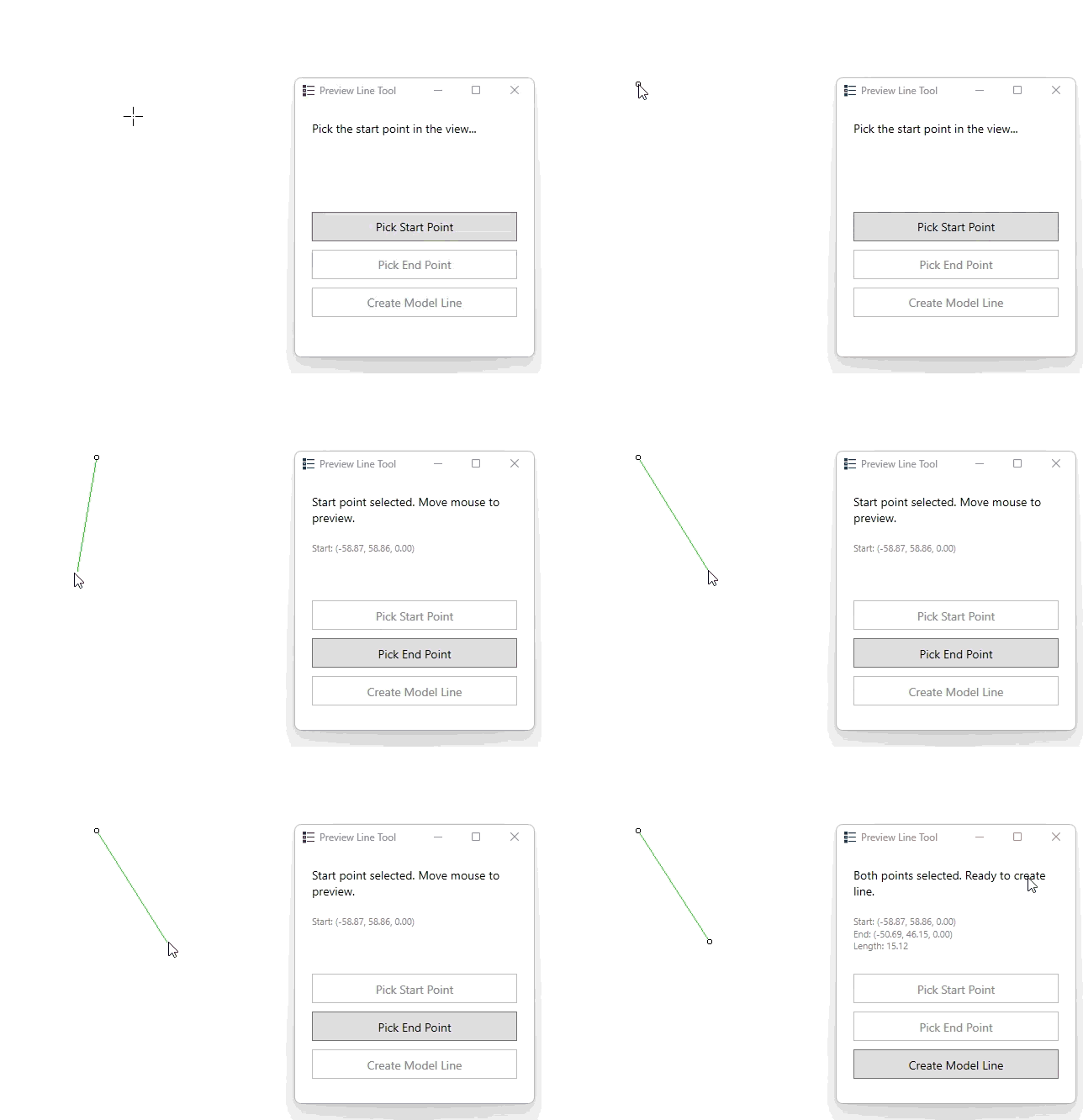
Anyway, I tried to implement sth like you’re descriping with the help of AI, quite fun, but not sth worth rolling out into a productive environment.
Here’s the code in case anyone has a similiar usecase, the custom tooltip by thebuildingcoder can be used a baseline to start with as well.
from pyrevit import framework, revit, HOST_APP, script, forms
from pyrevit import DB, UI

__persistentengine__ = True

# Global state
dc3d_server = None
tracker = None
idling_handler = None
selection_handler = None
p1 = None
p2 = None
ui_instance = None


def create_line_mesh(start, end, color=DB.ColorWithTransparency(255, 0, 0, 0)):
    edge = revit.dc3dserver.Edge(start, end, color)
    mesh = revit.dc3dserver.Mesh([edge], [])
    return mesh


def create_cube_mesh(center, size=0.3, color=DB.ColorWithTransparency(255, 0, 0, 0)):
    bb = DB.BoundingBoxXYZ()
    bb.Min = DB.XYZ(-size, -size, -size)
    bb.Max = DB.XYZ(size, size, size)
    bb.Transform = DB.Transform.CreateTranslation(center)
    mesh = revit.dc3dserver.Mesh.from_boundingbox(bb, color, black_edges=True)
    return mesh


def get_mouse_model_point():
    ui_view = revit.active_ui_view
    if not ui_view:
        return None

    # --- 1. Get the current Windows mouse position ---
    p = framework.Forms.Cursor.Position

    # --- 2. Get the Revit UIView window rectangle ---
    rect = ui_view.GetWindowRectangle()

    # Check bounds
    if p.X < rect.Left or p.X > rect.Right:
        return None
    if p.Y < rect.Top or p.Y > rect.Bottom:
        return None

    # --- 3. Compute relative mouse position inside the view ---
    dx = float(p.X - rect.Left) / float(rect.Right - rect.Left)
    dy = float(p.Y - rect.Bottom) / float(rect.Top - rect.Bottom)

    # NOTE: dy uses Bottom->Top order because Windows Y grows downwards

    # --- 4. Convert to model coordinates using zoom corners ---
    corners = ui_view.GetZoomCorners()
    a = corners[0]   # bottom-left point in model coords
    b = corners[1]   # top-right point in model coords

    v = b - a  # diagonal of the view box

    # Build the point in model coordinates
    q = DB.XYZ(
        a.X + dx * v.X,
        a.Y + dy * v.Y,
        a.Z + dx * v.Z  # Perspective views have z variation
    )

    return q


class MouseTracker:
    def __init__(self, start_point, dc3d_server_instance):
        self.start_point = start_point
        self.dc3d_server = dc3d_server_instance
        self.is_active = False
        self.last_mouse_point = None
        self.frame_skip = 0

    def on_idling(self, sender, args):
        """Called during Revit's idle time"""
        if not self.is_active:
            return

        self.frame_skip += 1
        if self.frame_skip < 2:
            return
        self.frame_skip = 0

        try:
            mouse_point = get_mouse_model_point()

            if mouse_point is None:
                return

            if self.last_mouse_point is not None:
                delta = mouse_point.DistanceTo(self.last_mouse_point)
                if delta < 0.1:
                    return

            self.last_mouse_point = mouse_point

            line_color = DB.ColorWithTransparency(0, 255, 0, 100)
            preview_line = create_line_mesh(self.start_point, mouse_point, line_color)

            # Show start point cube and preview line
            start_cube = create_cube_mesh(
                self.start_point, 0.2, DB.ColorWithTransparency(255, 0, 0, 0)
            )
            self.dc3d_server.meshes = [start_cube, preview_line]
            revit.uidoc.RefreshActiveView()

        except Exception as e:
            print("Error in mouse tracking: " + str(e))

    def start(self):
        self.is_active = True

    def stop(self):
        self.is_active = False


def on_selection_changed(sender, args):
    """Triggered when user clicks in Revit view after selecting p1."""
    global tracker, selection_handler

    # Trigger second pick
    ui_instance.end_event.Raise()


# External Event Handlers
class PickStartPointHandler(UI.IExternalEventHandler):
    def Execute(self, uiapp):
        global p1, tracker, idling_handler, dc3d_server, ui_instance, selection_handler
        try:
            p1 = revit.pick_point("Pick start point")
            if p1:
                # Show start point cube
                start_cube = create_cube_mesh(
                    p1, 0.2, DB.ColorWithTransparency(255, 0, 0, 0)
                )
                dc3d_server.meshes = [start_cube]
                revit.uidoc.RefreshActiveView()

                # Set up mouse tracking
                tracker = MouseTracker(p1, dc3d_server)
                idling_handler = framework.EventHandler[UI.Events.IdlingEventArgs](
                    tracker.on_idling
                )
                HOST_APP.uiapp.Idling += idling_handler
                tracker.start()

                selection_handler = framework.EventHandler[UI.Events.SelectionChangedEventArgs](on_selection_changed)
                HOST_APP.uiapp.SelectionChanged += selection_handler

                # Update UI state
                if ui_instance:
                    ui_instance.Dispatcher.Invoke(
                        framework.System.Action(ui_instance.update_after_start_point)
                    )
        except Exception as ex:
            print("Error picking start point: " + str(ex))

    def GetName(self):
        return "Pick Start Point Handler"


class PickEndPointHandler(UI.IExternalEventHandler):
    def Execute(self, uiapp):
        global p1, p2, tracker, dc3d_server, ui_instance, selection_handler
        try:
            if selection_handler:
                try:
                    HOST_APP.uiapp.SelectionChanged -= selection_handler
                except:
                    pass
                selection_handler = None
            p2 = revit.pick_point("Pick end point")
            if p2:
                # Stop tracking
                if tracker:
                    tracker.stop()

                # Show both points and final line
                start_cube = create_cube_mesh(
                    p1, 0.2, DB.ColorWithTransparency(255, 0, 0, 0)
                )
                end_cube = create_cube_mesh(
                    p2, 0.2, DB.ColorWithTransparency(0, 0, 255, 0)
                )
                final_line = create_line_mesh(
                    p1, p2, DB.ColorWithTransparency(0, 255, 0, 0)
                )
                dc3d_server.meshes = [start_cube, end_cube, final_line]
                revit.uidoc.RefreshActiveView()

                # Update UI state
                if ui_instance:
                    distance = p1.DistanceTo(p2)
                    ui_instance.Dispatcher.Invoke(
                        framework.System.Action(
                            lambda: ui_instance.update_after_end_point(distance)
                        )
                    )
        except Exception as ex:
            print("Error picking end point: " + str(ex))

    def GetName(self):
        return "Pick End Point Handler"


class CreateLineHandler(UI.IExternalEventHandler):
    def Execute(self, uiapp):
        global p1, p2, dc3d_server, ui_instance
        try:
            if p1 and p2:
                with revit.Transaction("Create Model Line"):
                    line = DB.Line.CreateBound(p1, p2)

                    sketch_plane = revit.doc.ActiveView.SketchPlane
                    if sketch_plane is None:
                        plane = DB.Plane.CreateByNormalAndOrigin(DB.XYZ.BasisZ, p1)
                        sketch_plane = DB.SketchPlane.Create(revit.doc, plane)

                    model_line = revit.doc.Create.NewModelCurve(line, sketch_plane)

                print("Model line created successfully!")

                # Clear preview meshes
                dc3d_server.meshes = []
                revit.uidoc.RefreshActiveView()

                # Update UI state
                if ui_instance:
                    ui_instance.Dispatcher.Invoke(
                        framework.System.Action(ui_instance.reset_ui)
                    )
        except Exception as ex:
            print("Error creating model line: " + str(ex))

    def GetName(self):
        return "Create Line Handler"


class PreviewLineUI(forms.WPFWindow):
    def __init__(self):
        global ui_instance, dc3d_server

        # Create inline XAML
        xaml_string = """
        <Window xmlns="http://schemas.microsoft.com/winfx/2006/xaml/presentation"
                xmlns:x="http://schemas.microsoft.com/winfx/2006/xaml"
                Title="Preview Line Tool"
                Width="300" Height="340"
                WindowStartupLocation="CenterScreen"
                ShowInTaskbar="False"
                Topmost="True">
            <StackPanel Margin="20">
                <TextBlock x:Name="txtStatus"
                          Text="Click 'Start' to begin"
                          FontSize="14"
                          Margin="0,0,0,20"
                          TextWrapping="Wrap"/>

                <TextBlock x:Name="txtInfo"
                          Text=""
                          FontSize="11"
                          Foreground="Gray"
                          Margin="0,0,0,20"
                          TextWrapping="Wrap"
                          Height="50"/>

                <Button x:Name="btnStart"
                       Content="Pick Start Point"
                       Height="35"
                       Margin="0,0,0,10"
                       FontSize="14"/>

                <Button x:Name="btnEnd"
                       Content="Pick End Point"
                       Height="35"
                       Margin="0,0,0,10"
                       FontSize="14"
                       IsEnabled="False"/>

                <Button x:Name="btnCreate"
                       Content="Create Model Line"
                       Height="35"
                       FontSize="14"
                       IsEnabled="False"/>
            </StackPanel>
        </Window>
        """

        forms.WPFWindow.__init__(self, xaml_source=xaml_string, literal_string=True)

        dc3d_server = revit.dc3dserver.Server(uidoc=revit.uidoc)
        if not dc3d_server:
            script.exit()

        ui_instance = self

        # Create external events
        self.start_handler = PickStartPointHandler()
        self.start_event = UI.ExternalEvent.Create(self.start_handler)

        self.end_handler = PickEndPointHandler()
        self.end_event = UI.ExternalEvent.Create(self.end_handler)

        self.create_handler = CreateLineHandler()
        self.create_event = UI.ExternalEvent.Create(self.create_handler)

        # Wire up button events
        self.btnStart.Click += self.on_start_click
        self.btnEnd.Click += self.on_end_click
        self.btnCreate.Click += self.on_create_click

        self.Closed += self.form_closed

    def on_start_click(self, sender, args):
        self.txtStatus.Text = "Pick the start point in the view..."
        self.start_event.Raise()

    def on_end_click(self, sender, args):
        self.txtStatus.Text = "Pick the end point in the view..."
        self.end_event.Raise()

    def on_create_click(self, sender, args):
        self.txtStatus.Text = "Creating model line..."
        self.create_event.Raise()

    def update_after_start_point(self):
        global p1
        self.btnStart.IsEnabled = False
        self.btnEnd.IsEnabled = True
        self.btnCreate.IsEnabled = False
        self.txtStatus.Text = "Start point selected. Move mouse to preview."
        coord_text = "Start: ({0:.2f}, {1:.2f}, {2:.2f})".format(p1.X, p1.Y, p1.Z)
        self.txtInfo.Text = coord_text

    def update_after_end_point(self, distance):
        global p1, p2
        self.btnStart.IsEnabled = False
        self.btnEnd.IsEnabled = False
        self.btnCreate.IsEnabled = True
        self.txtStatus.Text = "Both points selected. Ready to create line."
        coord_text = "Start: ({0:.2f}, {1:.2f}, {2:.2f})\nEnd: ({3:.2f}, {4:.2f}, {5:.2f})\nLength: {6:.2f}".format(
            p1.X, p1.Y, p1.Z, p2.X, p2.Y, p2.Z, distance
        )
        self.txtInfo.Text = coord_text

    def reset_ui(self):
        global p1, p2
        p1 = None
        p2 = None
        self.btnStart.IsEnabled = True
        self.btnEnd.IsEnabled = False
        self.btnCreate.IsEnabled = False
        self.txtStatus.Text = "Line created! Click 'Start' for another."
        self.txtInfo.Text = ""

    def form_closed(self, sender, args):
        """Clean up when form is closed"""
        global tracker, idling_handler, dc3d_server, selection_handler

        if tracker:
            tracker.stop()
        if idling_handler:
            try:
                HOST_APP.uiapp.Idling -= idling_handler
            except:
                pass
        if selection_handler:
            try:
                HOST_APP.uiapp.SelectionChanged -= selection_handler
            except:
                pass
        # Clear preview meshes
        if dc3d_server:
            dc3d_server.meshes = []
            revit.uidoc.RefreshActiveView()


# Launch the modeless window
if __name__ == "__main__":
    PreviewLineUI().Show()