I’ve come to a point where the default forms for some scripts don’t cut it. So I want to dive into a new world of custom forms (like we see in many pyrevit scripts).
I’ve watched some videos about this topic but they don’t seem to match with the nowadays scripts with custom forms.
Good question.
My reply from today would have been different from month ago.
Don’t bother, use cursor or the like. Provide a pushbutton that has something similar in terms of UI architecture, provide a mockup or a text description of the layout and off you go.
Extra point here, @pyrevti did a set of refactored UI components in wip. Add the pyrevit dev tools extension and look for the settings button on the right of this tab for a cool yet simple example to make better ui
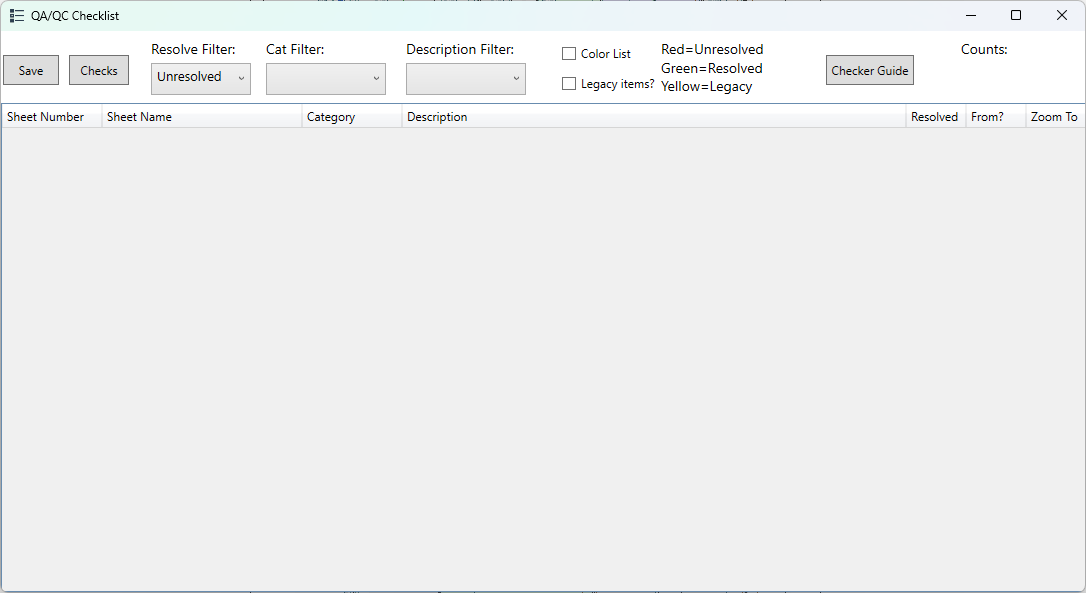
Not sure if this the conventional method or most up to date method. If I need a custom form, I use WPF and .xaml files to build what I need. This is probably the most complex form I have created so far.
The main reason I went this route is to be able to create modeless forms so that users can keep this list of issues open on one window and still have access to Revit. I got this idea originally from the Color Splasher code but that was before they changed the UI in the WIP version so I don’t know if it is going a different route now/soon.