Cpython errors after pyrevit CLI deployment

Hello,

I am a sysadmin and I am trying to create a deployment of pyRevit for the client machines. I have a powershell script that removes any existing versions of pyRevit/appdata folders contents, etc, and then installs the pyRevit CLI 5.3.1, clones pyRevit, installs some extensions, and then attaches it to all installed Revit versions.

After some polishing the script works fine but when I asked the pyRevit SME to log into Revit and test it, we are seeing errors similar to this one:

2025-12-04 12:46:46,431 ERROR [pyrevit.userconfig] Can not determine cpython engines for current attachment: Unknown | Product: “2025 First Customer Ship” | Manifest: “C:\ProgramData\Autodesk\Revit\Addins\2025\pyRevit.addin”

This happens in every version of Revit we have tested. The workstation has ironPython 2.7.12 installed and that was what was specified in the “attach” command…

I installed python 3.14.0 after that but the issue persists.

How can I fix this issue- either after deployment or during it?

Thanks,

Hi,

What I see reading you:

  1. Not an issue per se, No need to install ipy2712, the engine comes with pyrevit. (Nor python 3.14)
  2. pyrevit attach CloneName default --installed --allusers default refers to ipy2712 which is the default python engine. That could be your issue. 99% of the tools are designed around ipy. So basically, pyrevit requires attachment to na ipy engine by default (assuming you are setting default tools)

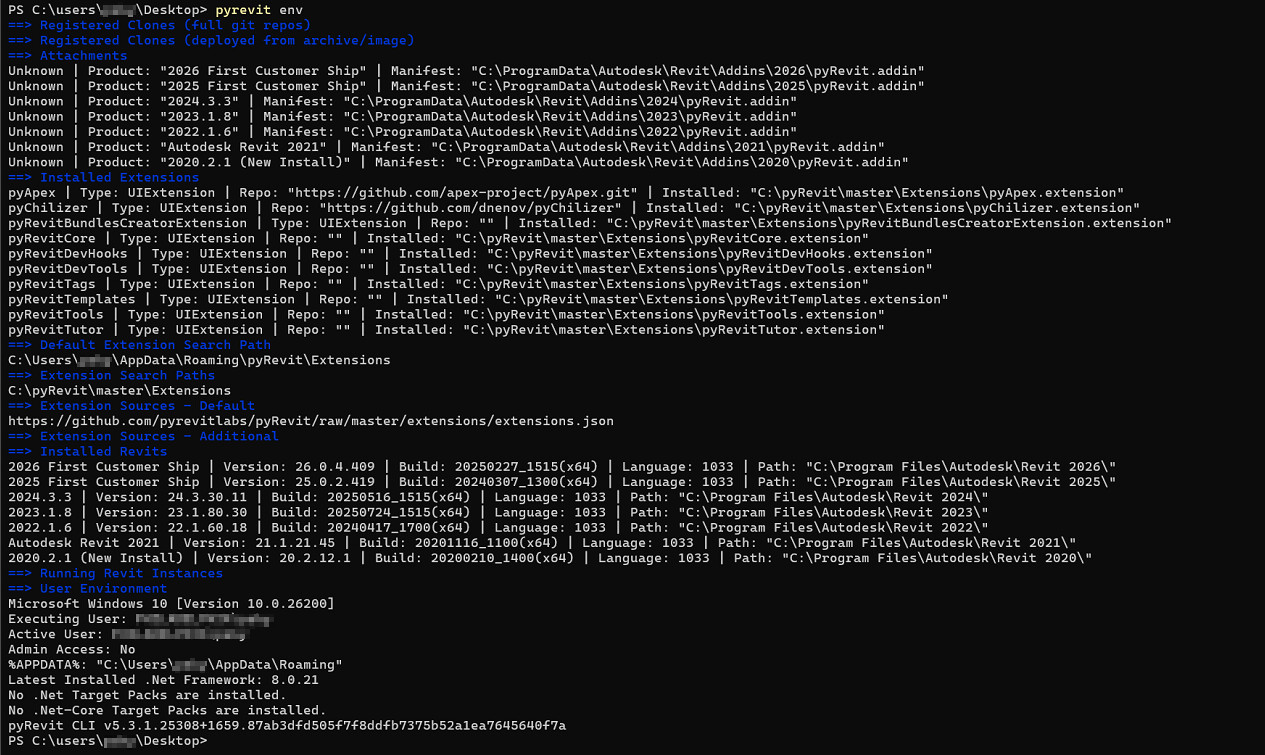
What does pyrevit env returns after install?

Hello Jean-Marc,

Here is what “pyrevit env” returns:

I’m not actually a user of Revit/pyRevit, I am just a sysadmin who is responsible for deploying applications to the environment/workstations. I have the SMEs test with me when I deploy the architectural/construction applications, so any help in debugging this is much appreciated!

Sincerely,

1 Like

before my point #2 and the command:
pyrevit attach CloneName default --installed --allusers
you may be missing :
pyrevit clones add CloneName Path-to-your-pyrevit-directory

if that runs correctly the pyrevit env should return something under attachments
I am interested in that portion

Hi Jean-Marc,

is the command “clones” or “clone”?

I have this line before the attach cmd:

pyrevit clone $cloneName --dest=“$installPath”

so do I need another one like:

pyrevit clones add $cloneName $installPath

$installPath is c:\pyRevit at this point

Thanks for the clarification and your help so far!

The best I can do tonight is pointing you at Pyrevit for teams

Hi Jean-Marc,

I was able to figure it out and got that issue solved.

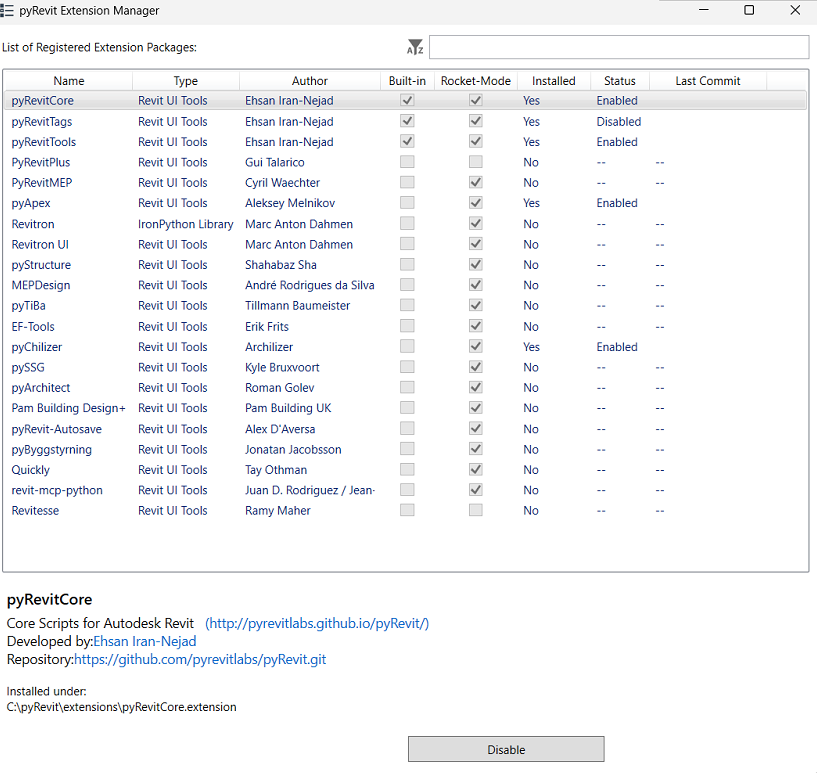
However, for some reason the pyRevit CLI is not installing the pyRevit Bundles Creator plugin and it’s not listed in the plugins section. Do you know what might be causing this?
Your deployment script would be helpful here.

I guess this is because of this list of deployment sets

I could add another one with the bundlecreator extension for convenience, if you like.

Hello Jean-Marc,

Here is the PS code:

# Configuration
$pyRevitVersion = "latest"  
$installPath = "C:\pyRevit"
$cloneName = "master"

# 1. Download and install pyRevit CLI
Write-Host "`n[1/4] Downloading pyRevit CLI installer..." -ForegroundColor Yellow
New-Item -ItemType directory -Path C:\temp\pyRevit -Force

$installerUrl = "https://github.com/pyrevitlabs/pyRevit/releases/download/v5.3.1.25308%2B1659/pyRevit_CLI_5.3.1.25308_admin_signed.msi"
$installerPath = "C:\temp\pyRevit\pyRevit_CLI.msi"

try {
    # Download installer
    Start-BitsTransfer -Source $installerUrl -Destination $installerPath
    Write-Host "✓ Downloaded successfully" -ForegroundColor Green
    
    # Install pyRevit CLI
    Write-Host "`n[2/4] Installing pyRevit CLI..." -ForegroundColor Yellow
    Start-Process -FilePath $installerPath `
              -Wait `
              -ArgumentList "/qn" > $null
    Write-Host "✓ pyRevit CLI installed" -ForegroundColor Green
    
    # Wait for installation to complete
    Start-Sleep -Seconds 5
    
} catch {
    Write-Host "✗ Error downloading/installing: $_" -ForegroundColor Red
    exit 1
}

# 2. Add pyRevit to PATH if not already there
Write-Host "`n[3/4] Configuring environment..." -ForegroundColor Yellow
$pyRevitCliPath = "C:\Program Files\pyRevit CLI"

if (Test-Path $pyRevitCliPath) {
    $currentPath = [Environment]::GetEnvironmentVariable("Path", "Machine")
    if ($currentPath -notlike "*$pyRevitCliPath*") {
        [Environment]::SetEnvironmentVariable(
            "Path",
            "$currentPath;$pyRevitCliPath",
            "Machine"
        )
        Write-Host "✓ Added to system PATH" -ForegroundColor Green
        # Refresh PATH for current session
        $env:Path = [Environment]::GetEnvironmentVariable("Path", "Machine")
    } else {
        Write-Host "Already in PATH" -ForegroundColor Gray
    }
}

# 3. Clone pyRevit repository
Write-Host "`n[4/4] Cloning pyRevit repository..." -ForegroundColor Yellow

# Wait a bit more to ensure CLI is ready
Start-Sleep -Seconds 3

try {
	# Close all open revits first
	& "$pyRevitCliPath\pyrevit.exe" revits kill all
	Write-Host "✓ closed all open revits first" -ForegroundColor Green
	
    # Clone pyRevit
    & "$pyRevitCliPath\pyrevit.exe" clone $cloneName base --dest="$installPath"
    Write-Host "✓ pyRevit cloned successfully" -ForegroundColor Green
    
	Write-Host "`nInstalling extensions..." -ForegroundColor Yellow
	# pyRevit extension install path
	$installpathandclone = $(Join-Path $installPath $cloneName)
	$pyrevitexts = $(Join-Path $installpathandclone "Extensions")
    
    # install extensions now
    Write-Output "Cloning Extensions..."
    & "$pyRevitCliPath\pyrevit.exe" extend "pyApex" --dest=$pyrevitexts
	& "$pyRevitCliPath\pyrevit.exe" extend "pyChilizer" --dest=$pyrevitexts
	#& "$pyRevitCliPath\pyrevit.exe" extend "pyRevitBundlesCreatorExtension" --dest=$pyrevitexts
	Write-Host "✓ Installed extensions" -ForegroundColor Green
	
	
    # Attach to all installed Revit versions
    Write-Host "`nAttaching to installed Revit versions..." -ForegroundColor Yellow
    & "$pyRevitCliPath\pyrevit.exe" attach $cloneName 2712 --installed --allusers
    Write-Host "✓ Attached to Revit (all users)" -ForegroundColor Green
    
} catch {
    Write-Host "✗ Error during clone/attach: $_" -ForegroundColor Red
}

# 5. Verify installation
Write-Host "`n========================================" -ForegroundColor Cyan
Write-Host "Verifying installation..." -ForegroundColor Yellow
& "$pyRevitCliPath\pyrevit.exe" clones
& "$pyRevitCliPath\pyrevit.exe" attached

# 6. Update C:\pyRevit folder permissions
icacls "C:\pyRevit" --% /grant:r Users:(OI)(CI)F /T /C

Write-Host "`n========================================" -ForegroundColor Cyan
Write-Host "pyRevit installation completed!" -ForegroundColor Green
Write-Host "Installation location: $installPath" -ForegroundColor Cyan
Write-Host "Users should restart Revit to see pyRevit." -ForegroundColor Cyan
Write-Host "========================================" -ForegroundColor Cyan

# Cleanup
Remove-Item $installerPath -Force -ErrorAction SilentlyContinue

Yes, the file I pointed you shows the typical deployments. Here, you are using the ‘base’ one

Hi Jean-Marc,

I now see what you’re saying… OK what is the one that includes the bundles creator?
Thanks!

In the file I linked earlier, there is a deployment key

Under that key, you will find ‘base’ which contraint the list of extensions coming with this deployment.

The bundlecreator is not part of any of the deployments listed in there.

I could add a deployment type, if you need it.

Hi Jean-Marc,

Yes, could you please add it?

Thanks so much!

Added to base deployment

Enjoy

1 Like

Hi Jean-Marc,

Thanks for your assistance, the plugin now installs.

Sincerely,

Kalin

1 Like