I think this is another quintessential example of a tool that should already be native to Revit.
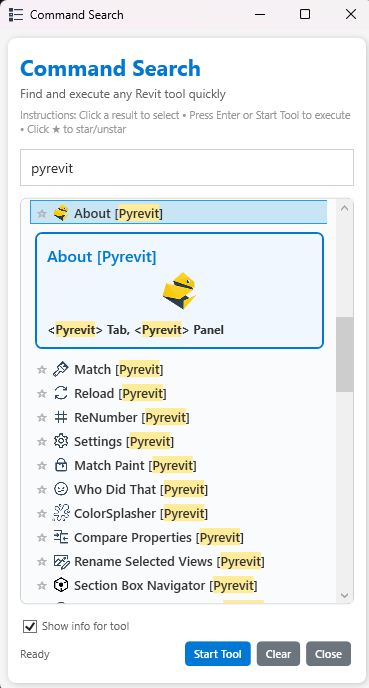
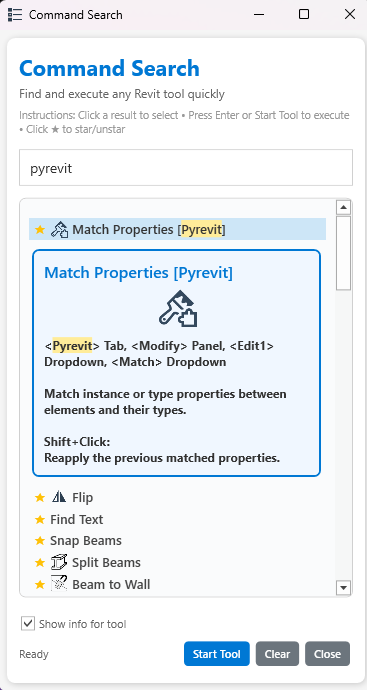
With the help of Claude Opus 4.7, I developed a better search tool for easily finding and activating any tool; very useful if you don’t know where a tool lives or if it’s hidden in a massive pulldown. It’s a modeless window, so it stays open while you work, and lets you star your favorite tools for quick access. It also shows you the location of pyRevit built tools in the toolbar, as well as any tool help information
I’d love to add it to pyRevit, but a couple of things before I create a PR:
Is this worth sharing right now? Looking for honest feedback. There are nearly 2,900 lines of code, and in all likelihood, there are a few bugs I’m not aware of or don’t know how to fix yet.
Should I propose it as a replacement for the existing Search tool? PyRevit already has a search command; would it make sense to pitch this as an upgrade, or better to keep it as a standalone tool?
Those screenshots look great. However, I like the simplicity of the existing search. A lot of programs rely on that sort of command palette – VS Code is a good example. Being able to hit a shortcut, type in the tool you want to use, and keep going is what gives a real productivity boost.
It would be great to improve the existing search, both in terms of functionality and stability. I just went to use it a couple minutes ago and it threw an error, then Revit crashed and lost some work.
Thanks for the input! I totally agree — shortcuts are the way to go! I think this tool is especially useful for those who aren’t as familiar with Revit yet. Instead of digging through ribbon tabs or hunting down supplementary documents about what the tools do, they can search for any tool by name, see its icon, find where it lives in the toolbar, and quickly use it from the persistent search window.
I’ve also considered adding the ability to see, and set, the shortcuts for tools in the window; curious what you think?
I don’t think there is a Revit API way to interact with shortcuts. You would have to read the keyboard shortcuts XML. Have you explored whether it is possible to reload the shortcuts while Revit is running? I think the native keyboard shortcut editor, while not very well implemented, is good enough.
How about making your tool so it pops up with a keyboard shortcut, and you can either pin it to keep it up, or launch a tool and it goes away? Have the list of tools so you can sort it by run count/last run date, alphabetically, by tab, etc. A column for the keyboard shortcut shouldn’t be hard to add just for information or sorting, if you think that is important.
The undocumented adwindows.dll has the ability to switch the active tab, which I think a new Revit user would find very useful after finding a tool.
 star your favorite tools for quick access. It also shows you the location of pyRevit built tools in the toolbar, as well as any tool help information