I’m following the syntax for context directives here. I’m using the following context directives, but it fails upon loading:
context:
  - exact:
    - OST_Dimensions
I receive an availability command error similar to this old issue, and the only way for me to get my pushbutton working again is to change my context to the following and restart Revit:
context: OST_Dimensions
I want to ensure that only dimensions are selected by the user, so the simplified version doesn’t work because it will enable the button if any dimension is included in the selection. I could filter out elements in my script, but it defeats the point of the documented context directives. Is this a bug that others have experienced recently?
Revit Version
26.4.10.51
20260406_1515(x64)
2026.4.1
pyRevit Version v6.4.0
Windows Version
Edition Windows 11 Pro
Version 25H2
Installed on 2/4/2025
OS build 26200.8655
Experience Windows Feature Experience Pack 1000.26100.315.0
I never use that. I always make it user stupid.
I let the user pre-select whatever they want. In the script I do the filtering. If the correct items aren’t selected, I fall back to asking for input. Again they can select whatever and it gets filtered. Rinse repeat until they get the right object or get tired and cancel. (…and it is the lazy way I like to select things.)
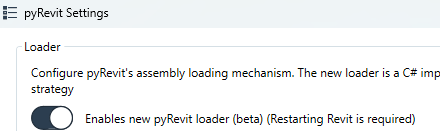
@pyrevti, what do you mean by “new launcher”? Is that a setting I can toggle in pyRevit? I haven’t completely wrapped my head around all the things pyRevit is doing at runtime—I assume it has something to do with initial startup when Revit opens…. I definitely want to try out your suggestion to see if that has any effect.
6.x introduced a new faster loader. This meant manually porting all features of the old launcher to the new one. Some may have been missed. You can toggle it here:
@pyrevti@aaronrumple The new launcher is definitely the culprit of this issue and others I’ve found. In addition to the non-functional context directives, I realized my pull-downs also disappeared with the new launcher.