Hello, I’m trying to create a script with Pyrevit where I select several elements to create an Assembly (more specifically a column, rebar, and concrete corbels - which are families of structural framing).
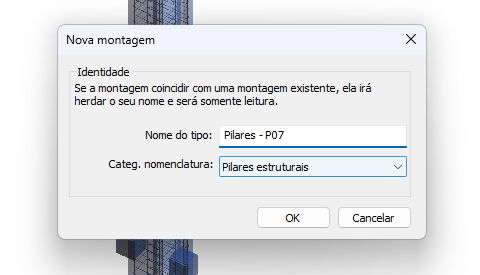
When I create the assembly manually, the type name is required along with the naming category, and it is done correctly [image]. However, with my code, the assembly is generated correctly, but when I try to rename it with AssemblyTypeName, I get the following error: Exception: No valid type for the assembly instance.
Does anyone know what I can do to solve this? Here’s my code.
# -*- coding: utf-8 -*-

from Autodesk.Revit.DB import *
from System.Collections.Generic import List
from Autodesk.Revit.UI.Selection import *
from pyrevit import script, DB

doc = __revit__.ActiveUIDocument.Document
uidoc = __revit__.ActiveUIDocument
output = script.get_output()

# seleção de elementos da montagem

elements_ids = List[ElementId]()

references = uidoc.Selection.PickObjects(ObjectType.Element)

for reference in references:
    element = doc.GetElement(reference)
    elements_ids.Add(element.Id)

pillar_id = None

for id in elements_ids:
    element = doc.GetElement(id)
    if element.Category and element.Category.Id.IntegerValue == int(
        BuiltInCategory.OST_StructuralColumns
    ):
        pillar_id = id
        break

pillar = doc.GetElement(pillar_id)

with Transaction(doc, "Criar montagem") as t:
    t.Start()
    assembly = AssemblyInstance.Create(doc, elements_ids, pillar.Category.Id)
    assembly.AssemblyTypeName = "Novo nome"
    t.Commit()
Hi, after some testing, I discovered what was causing the error.
Apparently, when initializing a transaction like the one I was doing, Revit doesn’t create the entity immediately, but rather provisionally. This can be determined by doing “assembly.GetTypeId()” inside the transaction, which will return “-1”, because the API doesn’t yet have a “type” associated with the newly created element. The solution is basically to isolate a transaction for each action (a bit obvious), to ensure that the manipulated elements actually exist in the project.
I’ll keep the post open in case anyone else has problems with transactions, since it’s common to use only one transaction throughout the script, even though it’s bad practice in many contexts.
pyRevit has a lot of wrappers and utility functions, that help you keep the code more readable and maintainable. Like so (untested!)
# -*- coding: utf-8 -*-

from pyrevit import script, revit, DB
from pyrevit.compat import get_elementid_value_func

get_elementid_value = get_elementid_value_func()  # in case you want to use it in Revit > 2024

doc = revit.doc
output = script.get_output()

# seleção de elementos da montagem

pillar_id = None

elements = revit.pick_elements()

for element in elements:
    if element.Category and get_elementid_value(element.Category.Id) == int(
        DB.BuiltInCategory.OST_StructuralColumns
    ):
        pillar_id = id
        break

pillar = doc.GetElement(pillar_id)

with revit.Transaction("Criar montagem"):
    assembly = DB.AssemblyInstance.Create(doc, elements, pillar.Category.Id)
    assembly.AssemblyTypeName = "Novo nome"