@AndreaTas, I have approached the same scenario similarly too, and have put together a sample project for others to use incase someone else faces a similar sitiuation, here:
A few things to note:
- you can make use of the dynamic object type to handle the varying API return types where needed within your executing command classes.
- I am using the Costura.Fody nuget package to utilise the version-specific APIs as embedded resources within my main compiled library and avoid missing references at runtime invocation of the commands.
- If you’re majorly writing your command for newer versions of the API, and need to support small functionality for older versions, then you only need the version-specific library project for the older API and wrap its execution into a conditional syntax that ensures it will only get triggered by Revit version checks.
Here are code samples from the repo:
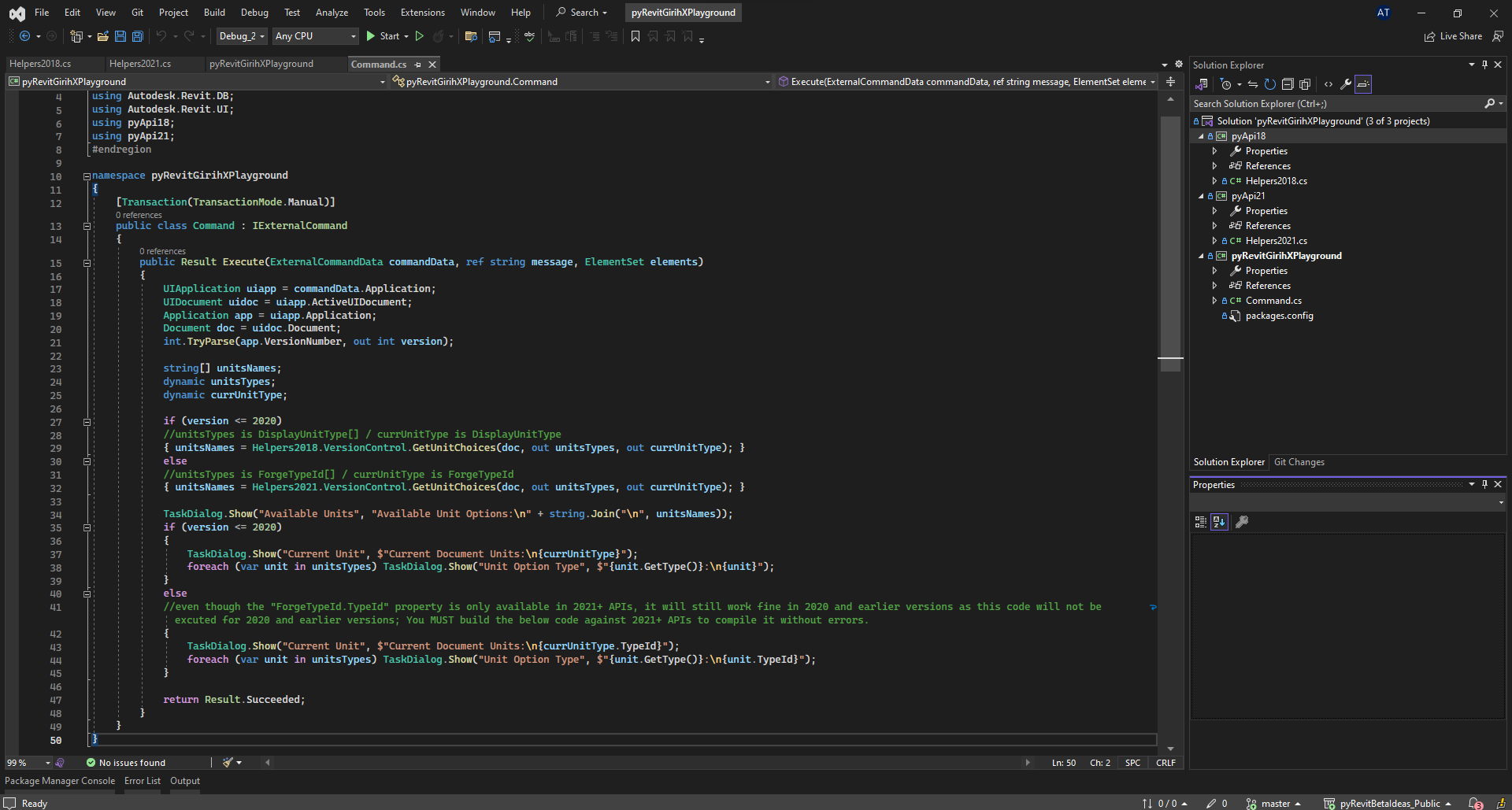
The Main executing Command class
#region Namespaces
using Autodesk.Revit.ApplicationServices;
using Autodesk.Revit.Attributes;
using Autodesk.Revit.DB;
using Autodesk.Revit.UI;
using pyApi18;
using pyApi21;
#endregion

namespace pyRevitGirihXPlayground
{
    [Transaction(TransactionMode.Manual)]
    public class Command : IExternalCommand
    {
        public Result Execute(ExternalCommandData commandData, ref string message, ElementSet elements)
        {
            UIApplication uiapp = commandData.Application;
            UIDocument uidoc = uiapp.ActiveUIDocument;
            Application app = uiapp.Application;
            Document doc = uidoc.Document;
            int.TryParse(app.VersionNumber, out int version);

            string[] unitsNames;
            dynamic unitsTypes;
            dynamic currUnitType;

            if (version <= 2020)
            //unitsTypes is DisplayUnitType[] / currUnitType is DisplayUnitType
            { unitsNames = Helpers2018.VersionControl.GetUnitChoices(doc, out unitsTypes, out currUnitType); }
            else
            //unitsTypes is ForgeTypeId[] / currUnitType is ForgeTypeId
            { unitsNames = Helpers2021.VersionControl.GetUnitChoices(doc, out unitsTypes, out currUnitType); }

            TaskDialog.Show("Available Units", "Available Unit Options:\n" + string.Join("\n", unitsNames));
            if (version <= 2020)
            {
                TaskDialog.Show("Current Unit", $"Current Document Units:\n{currUnitType}");
                foreach (var unit in unitsTypes) TaskDialog.Show("Unit Option Type", $"{unit.GetType()}:\n{unit}");
            }
            else
            /*even though the "ForgeTypeId.TypeId" property is only available in 2021+ APIs,
            * it will still work fine in 2020 and earlier versions as this code will not be executed
            * for 2020 and earlier versions; You MUST build the below code against 2021+ APIs
            * to compile it without errors.*/
            {
                TaskDialog.Show("Current Unit", $"Current Document Units:\n{currUnitType.TypeId}");
                foreach (var unit in unitsTypes) TaskDialog.Show("Unit Option Type", $"{unit.GetType()}:\n{unit.TypeId}");
            }

            return Result.Succeeded;
        }
    }
}
the 2018-2020 API supporting methods class library:
#region Namespaces
using Autodesk.Revit.DB;
using Autodesk.Revit.UI;
using System.Linq;
#endregion

namespace pyApi18
{
    public static class Helpers2018
    {
        public static class VersionControl
        {
            public static string[] GetUnitChoices(Document doc, out dynamic UnitOptions, out dynamic CurrentUnit)
            {
                TaskDialog.Show("Dynamic Version Test", "Helpers2018!");

                DisplayUnitType currentUnit = doc.GetUnits().GetFormatOptions(UnitType.UT_Length).DisplayUnits;
                DisplayUnitType[] unitOptions = new DisplayUnitType[]
                { DisplayUnitType.DUT_METERS, DisplayUnitType.DUT_CENTIMETERS, DisplayUnitType.DUT_MILLIMETERS, DisplayUnitType.DUT_DECIMAL_FEET };

                string[] UnitsNames = unitOptions.Select(i => i.ToString()).ToArray();
                UnitOptions = unitOptions;
                CurrentUnit = currentUnit;
                return UnitsNames;
            }
        }
    }
}
the 2021-2024 API supporting methods class library:
#region Namespaces
using Autodesk.Revit.DB;
using Autodesk.Revit.UI;
using System.Linq;
#endregion

namespace pyApi21
{
    public static class Helpers2021
    {
        public static class VersionControl
        {
            public static string[] GetUnitChoices(Document doc, out dynamic UnitOptions, out dynamic CurrentUnit)
            {
                TaskDialog.Show("Dynamic Version Test", "Helpers2021!");

                ForgeTypeId currentUnit = doc.GetUnits().GetFormatOptions(SpecTypeId.Length).GetUnitTypeId();
                ForgeTypeId[] unitOptions = new ForgeTypeId[]
                { UnitTypeId.Meters, UnitTypeId.Centimeters, UnitTypeId.Millimeters, UnitTypeId.Feet };

                string[] UnitsNames = unitOptions.Select(i => i.TypeId).ToArray();
                UnitOptions = unitOptions;
                CurrentUnit = currentUnit;
                return UnitsNames;
            }
        }
    }
}
Also, worth noting, the sample repo has:
-
Boilerplate for the invoke commands extension library folders and .invokebutton setup with a root-level lib folder
-
The VisualStudio project automatically copies the compiled solution to the extension’s lib folder with post-build events
-
The VisualStudio project conditionally switches references to the Revit API/UI from 2018-2024 based on the build configuration options (debug_2018, debug_2019, …etc) for ease of API reference testing
and compilation against the version of choice.


@AndreaTas, @Jean-Marc, and all, please feel free to improve and reshare with a PR.